> ## Documentation Index
> Fetch the complete documentation index at: https://docs.nudj.cx/llms.txt
> Use this file to discover all available pages before exploring further.
# Challenge Creation
> End-to-end walkthrough of the redesigned challenge creation flow
Challenges are the core unit of engagement — a set of actions members complete in exchange for points, XP, and rewards. Nudj's creation flow was rebuilt to be a single, focused wizard with preview and draft states.
## Start a challenge
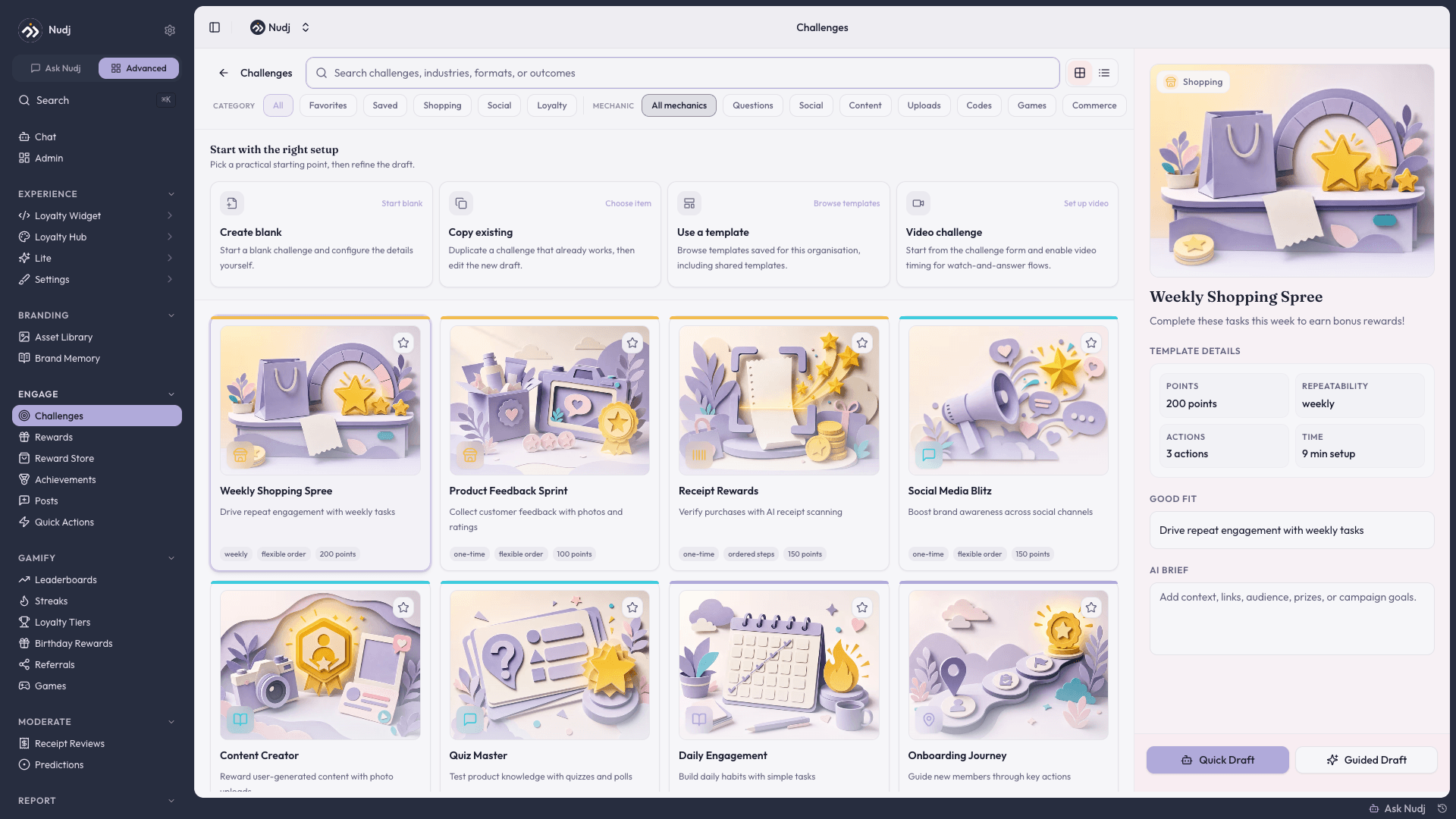
Hit the top-nav **+ New -> Challenge**. Nudj opens the **creation screen**, where you pick a starting method:
Empty challenge — you fill in every field yourself.
Duplicate a challenge that already works, then edit the new draft. Date fields are **excluded** from the copy so you don't accidentally ship with stale schedules (#2142).
Browse the template gallery — shared and org-saved templates — and start from a proven setup.
Opens the challenge form for a watch-and-answer flow. This button opens a blank form; video timing is enabled separately — see [Video Challenges](/admin-guide/challenges/video-challenges).
Blank drafts and templates can also be drafted for you by the Nudj Agent — use **Quick Draft** or **Guided Draft** to have it draft actions and rewards from your goal, then approve, edit, or retry.
 ***
## The wizard
After picking a method, you land in the unified challenge wizard with these form steps:
Title, description (rich text, up to 3000 chars), image (1:1 ratio 1440x1440), language, tags.
* **Featured** toggle highlights the challenge for VIPs.
* **Status** starts as Draft.
Add actions members must complete. Action types (grouped):
* **Question** — multiple choice, single choice with quiz mode, secret code (single-use or multi-use), free text, select-value-in-range, select-from-list, rating/NPS. See [Question Actions](/admin-guide/challenges/question-actions).
* **Social Media** — share, follow, YouTube video watch, YouTube subscribe. See [Social Media Actions](/admin-guide/challenges/social-media-actions).
* **Platform** — complete-achievement, check-in, streak, game. See [Platform Actions](/admin-guide/challenges/platform-actions).
* **Rich Media** — image upload, video action, object detection. See [Rich Media Actions](/admin-guide/challenges/rich-media-actions).
See the full [Action Types reference](/admin-guide/challenges/action-types-overview).
Attach **rewards**, **points**, and **XP** that members earn on completion. Rewards can be Assets (owned items), Entries (giveaway chances), or both. Each allocation has a **supply limit** so you don't over-issue.
See [Completion & Rewards](/admin-guide/challenges/completion-and-rewards) for the Distribution step in depth and the member's end-to-end completion journey.
* **Start date** (optional) — leave blank for immediate, set it for future-dated launches.
* **End date** (optional) — create urgency, or leave evergreen.
* **Progress period** — how long a single attempt can run before it times out.
* **Max completions per period** — rate-limit how often each member can complete a repeatable challenge.
Future-dated challenges automatically get **Scheduled** status. Nudj blocks you from flipping a future-dated challenge directly to Live (you'd publish into an empty window).
See [Calendar View](/admin-guide/challenges/calendar-view).
Tags, dark-mode images, [campaign](/admin-guide/challenges/campaigns) grouping, cross-community sync, accent colour, and template settings. (Key-gating via `unlockPrice` is a data field, not an editor control — see [Key-Gated Challenges](/admin-guide/challenges/unlock-keys).)
For challenges with manual-review actions (e.g. upload image for approval), configure the review queue. Admin reviewers see pending submissions in the [Review Achievement Flow](/admin-guide/achievements/reviewing-submissions) interface.
***
## Preview before launch
Hit **Preview** to open the **preview panel** beside the editor — a live member's-eye view of the challenge with a **desktop / mobile** toggle. Preview respects auth — you see the challenge as a real member would.
See [Challenge & Entity Preview](/admin-guide/challenges/preview-mode) for the full preview system.
***
## Publish
Status options:
| Status | Behaviour |
| ------------- | ----------------------------------------------------------- |
| **Draft** | Invisible to members. Edits autosave. |
| **Scheduled** | Auto-set when start date is future. Goes Live on that date. |
| **Live** | Visible and redeemable. |
| **Ended** | Past end date — visible as history, no new completions. |
| **Archived** | Admin-only — removed from member view. |
You can't publish a challenge with a future start date directly to **Live** — Nudj forces the **Scheduled** status so your action log stays accurate. (#1142)
***
## Copy and iterate
On any challenge row in the list view, use the **copy** action to duplicate. All content copies; date fields are cleared so you can pick a new schedule. See [Copy / Duplicate Items](/admin-guide/settings/duplicate-and-copy).
***
## What changed
| Change | Why |
| ----------------------------------------------- | ------------------------------------------------------------- |
| Single unified wizard (vs. old 2-screen wizard) | Fewer context switches, clearer step progression (#1186) |
| Creation-method modal | Makes duplicate and AI-drafted challenges first-class (#2297) |
| Preview panel | See the member view with a desktop / mobile toggle (#1942) |
| Future-dated Scheduled status | Prevents accidental publish into empty windows (#1142) |
| Copy-an-item with date exclusion | Templates can be reused without stale dates (#1412, #2142) |
| Unified + New button | Consistent creation entry point across the admin (#2409) |
***
## Next steps
The full taxonomy of actions available.
Group related challenges under a campaign.
The preview panel and auth-respecting walkthroughs.
Completion funnel, per-action stats, CSV export.
***
## The wizard
After picking a method, you land in the unified challenge wizard with these form steps:
Title, description (rich text, up to 3000 chars), image (1:1 ratio 1440x1440), language, tags.
* **Featured** toggle highlights the challenge for VIPs.
* **Status** starts as Draft.
Add actions members must complete. Action types (grouped):
* **Question** — multiple choice, single choice with quiz mode, secret code (single-use or multi-use), free text, select-value-in-range, select-from-list, rating/NPS. See [Question Actions](/admin-guide/challenges/question-actions).
* **Social Media** — share, follow, YouTube video watch, YouTube subscribe. See [Social Media Actions](/admin-guide/challenges/social-media-actions).
* **Platform** — complete-achievement, check-in, streak, game. See [Platform Actions](/admin-guide/challenges/platform-actions).
* **Rich Media** — image upload, video action, object detection. See [Rich Media Actions](/admin-guide/challenges/rich-media-actions).
See the full [Action Types reference](/admin-guide/challenges/action-types-overview).
Attach **rewards**, **points**, and **XP** that members earn on completion. Rewards can be Assets (owned items), Entries (giveaway chances), or both. Each allocation has a **supply limit** so you don't over-issue.
See [Completion & Rewards](/admin-guide/challenges/completion-and-rewards) for the Distribution step in depth and the member's end-to-end completion journey.
* **Start date** (optional) — leave blank for immediate, set it for future-dated launches.
* **End date** (optional) — create urgency, or leave evergreen.
* **Progress period** — how long a single attempt can run before it times out.
* **Max completions per period** — rate-limit how often each member can complete a repeatable challenge.
Future-dated challenges automatically get **Scheduled** status. Nudj blocks you from flipping a future-dated challenge directly to Live (you'd publish into an empty window).
See [Calendar View](/admin-guide/challenges/calendar-view).
Tags, dark-mode images, [campaign](/admin-guide/challenges/campaigns) grouping, cross-community sync, accent colour, and template settings. (Key-gating via `unlockPrice` is a data field, not an editor control — see [Key-Gated Challenges](/admin-guide/challenges/unlock-keys).)
For challenges with manual-review actions (e.g. upload image for approval), configure the review queue. Admin reviewers see pending submissions in the [Review Achievement Flow](/admin-guide/achievements/reviewing-submissions) interface.
***
## Preview before launch
Hit **Preview** to open the **preview panel** beside the editor — a live member's-eye view of the challenge with a **desktop / mobile** toggle. Preview respects auth — you see the challenge as a real member would.
See [Challenge & Entity Preview](/admin-guide/challenges/preview-mode) for the full preview system.
***
## Publish
Status options:
| Status | Behaviour |
| ------------- | ----------------------------------------------------------- |
| **Draft** | Invisible to members. Edits autosave. |
| **Scheduled** | Auto-set when start date is future. Goes Live on that date. |
| **Live** | Visible and redeemable. |
| **Ended** | Past end date — visible as history, no new completions. |
| **Archived** | Admin-only — removed from member view. |
You can't publish a challenge with a future start date directly to **Live** — Nudj forces the **Scheduled** status so your action log stays accurate. (#1142)
***
## Copy and iterate
On any challenge row in the list view, use the **copy** action to duplicate. All content copies; date fields are cleared so you can pick a new schedule. See [Copy / Duplicate Items](/admin-guide/settings/duplicate-and-copy).
***
## What changed
| Change | Why |
| ----------------------------------------------- | ------------------------------------------------------------- |
| Single unified wizard (vs. old 2-screen wizard) | Fewer context switches, clearer step progression (#1186) |
| Creation-method modal | Makes duplicate and AI-drafted challenges first-class (#2297) |
| Preview panel | See the member view with a desktop / mobile toggle (#1942) |
| Future-dated Scheduled status | Prevents accidental publish into empty windows (#1142) |
| Copy-an-item with date exclusion | Templates can be reused without stale dates (#1412, #2142) |
| Unified + New button | Consistent creation entry point across the admin (#2409) |
***
## Next steps
The full taxonomy of actions available.
Group related challenges under a campaign.
The preview panel and auth-respecting walkthroughs.
Completion funnel, per-action stats, CSV export.