> ## Documentation Index
> Fetch the complete documentation index at: https://docs.nudj.cx/llms.txt
> Use this file to discover all available pages before exploring further.
# Challenge Management
> List view, calendar view, filter, sort, copy, and campaign grouping for challenges at scale
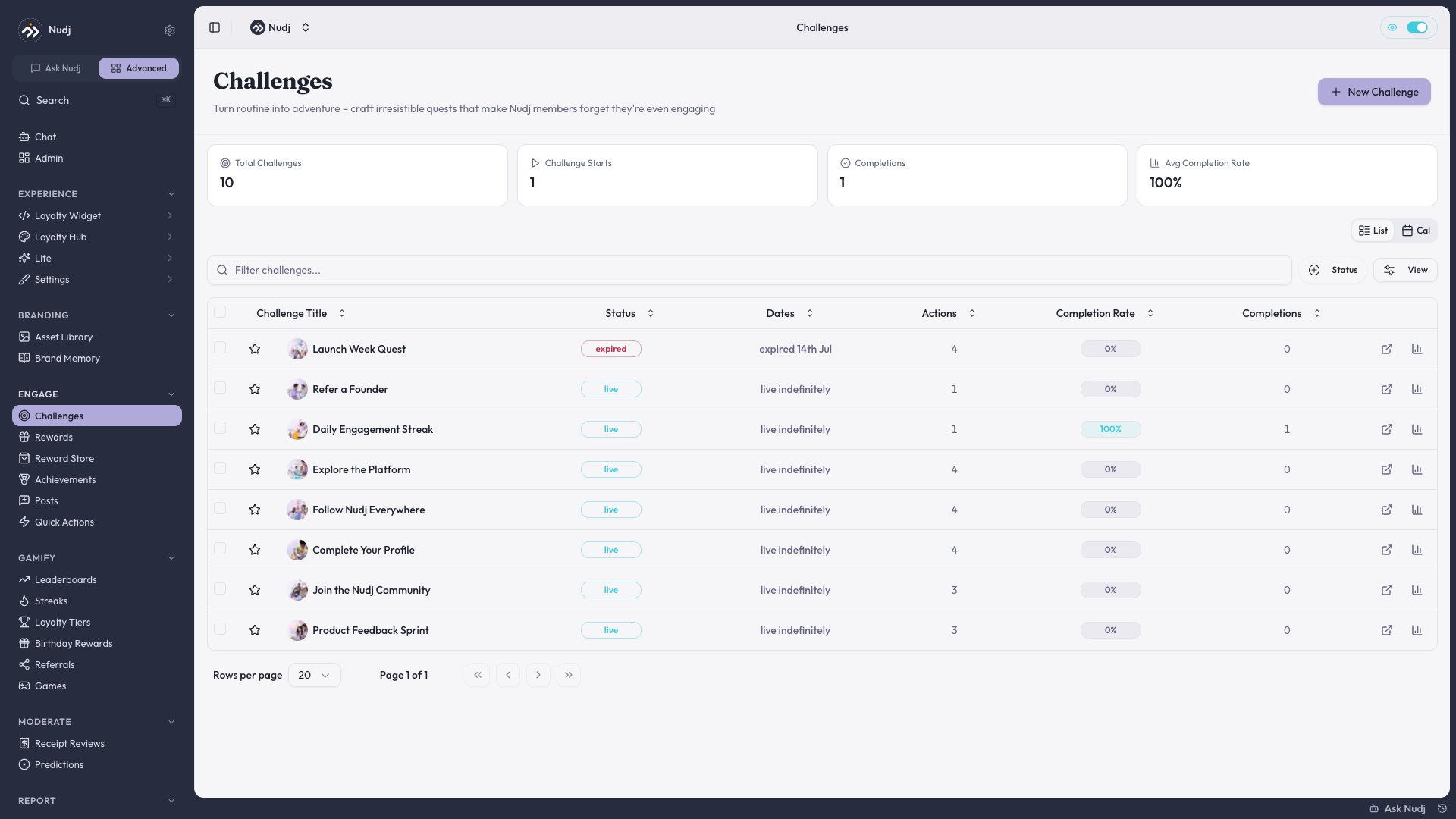
The challenge list page is your daily driver for managing dozens or hundreds of challenges. It was rebuilt around three patterns: a redesigned table with sticky columns, a unified filter drawer, and a calendar view for scheduling.
## List view
The default view is a redesigned **table** (#1155):
* **Sticky columns** (#782, #921) — title and key action buttons stay visible as you horizontally scroll.
* **Persisted sort** (#989) — once you pick a sort, it's remembered for the session.
* **Completion rate column** visible by default (see [Challenge Analytics](/admin-guide/challenges/analytics)).
* Status badges use theme-aware colours — success (live), warning (ending soon), destructive (expired), primary (scheduled).
 ### Unified filter drawer
Click **Filters** to open the drawer (#1017, #1507, #1523, #1540). Available filters:
* **Status** — Draft / Live / Scheduled / Ended / Archived
* **Date range** — created / start / end
* **Tag** — any applied tags
* **Action type** — filter by what's inside
* **Campaign** — show only challenges in a specific campaign
Filters persist across pagination.
***
## Calendar view
Switch to **Calendar view** (#1511) to see challenges on a month grid. Each challenge appears as a bubble spanning its start -> end dates.
Useful for:
* Spotting overlap / dead weeks
* Planning campaign timelines
* Scheduling around holidays
See [Calendar View](/admin-guide/challenges/calendar-view) for the full feature.
***
## Campaigns
Group related challenges into a **campaign** (#1127) — e.g. "Summer Launch", "Q4 Loyalty Push". Campaign members share start/end windows and show up together in the calendar.
See [Campaigns](/admin-guide/challenges/campaigns) for setup.
***
## Copy-an-item
On any challenge row, the row menu has **Duplicate** (#1412). It clones the entire challenge — actions, rewards, advanced settings — but **excludes date fields** (#2142) so you don't accidentally relaunch a past event. Picks a new name suffix ("(Copy)") by default.
See [Copy / Duplicate Items](/admin-guide/settings/duplicate-and-copy).
***
## Bulk edit & archive
Select multiple rows and bulk:
* Archive (moves status to Archived)
* Add / remove tags
* Export (CSV of selected challenges + stats)
Bulk archive is reversible — status flips to Archived, but nothing is deleted. Use the Archived filter to find them later.
***
## Tips
When your challenge count crosses \~20, switch to Calendar view for planning and back to List for day-to-day operations. The two views share the same filter state.
Use **campaign grouping** early — retroactively grouping 100 challenges into campaigns is painful.
### Unified filter drawer
Click **Filters** to open the drawer (#1017, #1507, #1523, #1540). Available filters:
* **Status** — Draft / Live / Scheduled / Ended / Archived
* **Date range** — created / start / end
* **Tag** — any applied tags
* **Action type** — filter by what's inside
* **Campaign** — show only challenges in a specific campaign
Filters persist across pagination.
***
## Calendar view
Switch to **Calendar view** (#1511) to see challenges on a month grid. Each challenge appears as a bubble spanning its start -> end dates.
Useful for:
* Spotting overlap / dead weeks
* Planning campaign timelines
* Scheduling around holidays
See [Calendar View](/admin-guide/challenges/calendar-view) for the full feature.
***
## Campaigns
Group related challenges into a **campaign** (#1127) — e.g. "Summer Launch", "Q4 Loyalty Push". Campaign members share start/end windows and show up together in the calendar.
See [Campaigns](/admin-guide/challenges/campaigns) for setup.
***
## Copy-an-item
On any challenge row, the row menu has **Duplicate** (#1412). It clones the entire challenge — actions, rewards, advanced settings — but **excludes date fields** (#2142) so you don't accidentally relaunch a past event. Picks a new name suffix ("(Copy)") by default.
See [Copy / Duplicate Items](/admin-guide/settings/duplicate-and-copy).
***
## Bulk edit & archive
Select multiple rows and bulk:
* Archive (moves status to Archived)
* Add / remove tags
* Export (CSV of selected challenges + stats)
Bulk archive is reversible — status flips to Archived, but nothing is deleted. Use the Archived filter to find them later.
***
## Tips
When your challenge count crosses \~20, switch to Calendar view for planning and back to List for day-to-day operations. The two views share the same filter state.
Use **campaign grouping** early — retroactively grouping 100 challenges into campaigns is painful.