> ## Documentation Index
> Fetch the complete documentation index at: https://docs.nudj.cx/llms.txt
> Use this file to discover all available pages before exploring further.
# Question Actions
> Every question-style action: multiple choice, single choice, quiz mode, secret codes, free text, ratings, select-from-list, select-value-in-range
Question actions collect structured input from members. They're the most flexible action family — ranging from quick one-taps (single choice) to long-form feedback (free text) and quantitative (NPS, rating, value-in-range).
## Action types
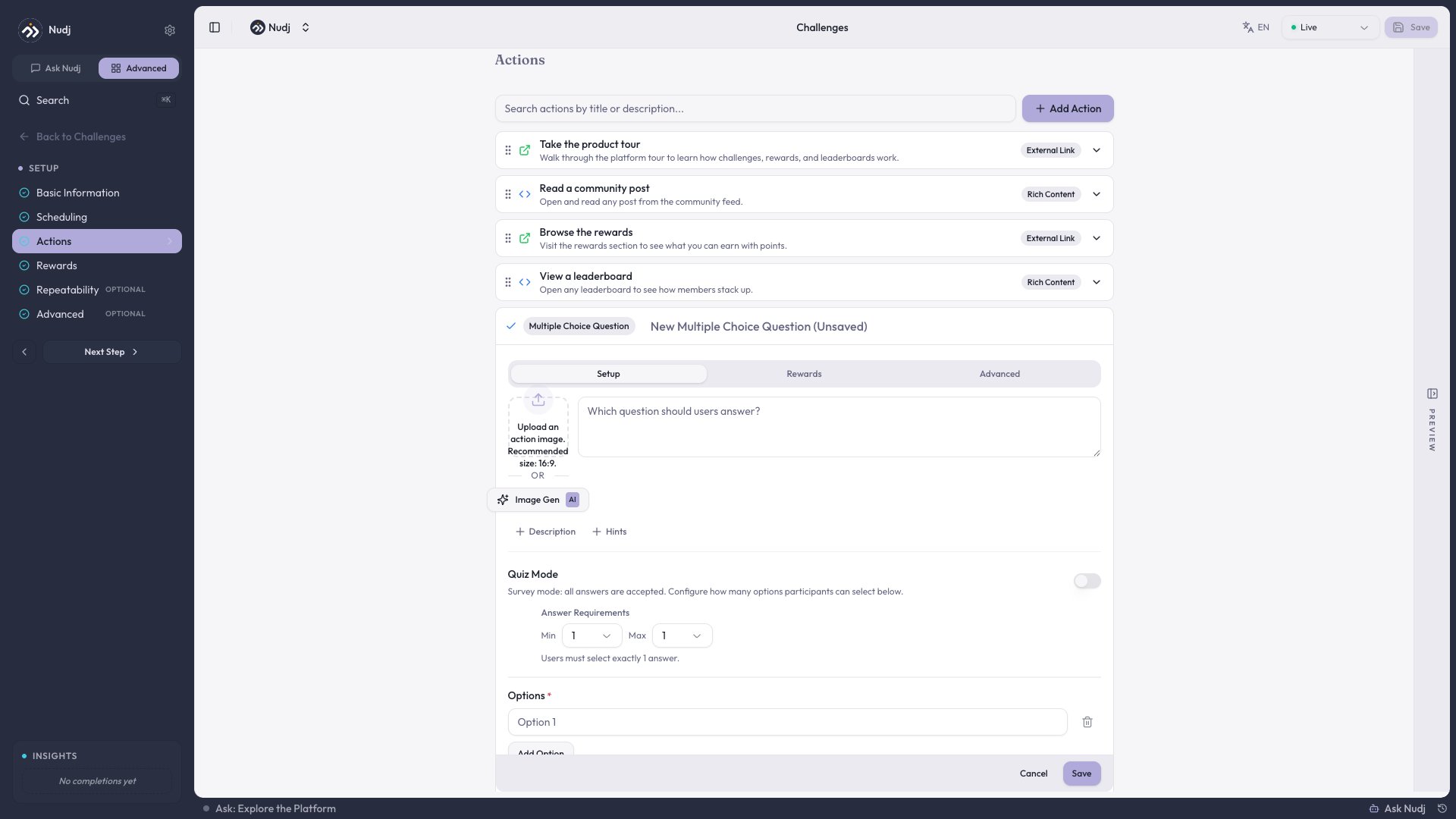
Members pick one or more options from a list.
* **Quiz mode** toggle marks correct answer(s); the admin sees accuracy stats (#923).
* **CSV upload is no longer available** for multi-choice (removed in #854) — add options manually for full translation control.
* Add a **banner image** above the question (#647).
Members pick exactly one option. Same quiz-mode support as multiple-choice.
Members enter a code you share out of band (e.g. in-store sticker).
* **Single-use** — each code can be redeemed once per member.
* **Multi-use** — shared code, unlimited redemptions per member.
Toggle between modes when you create or edit the action (#1012).
Open-ended answer. Reported back as raw submissions in analytics.
Open-ended stats were fixed in #730 so partial responses no longer distort counts.
Scale (1-5 stars or 0-10 NPS). Reporting shows average, distribution, and NPS score. Fixes shipped in #913 for accurate aggregate numbers.
Slider between a min and max. Useful for "how satisfied" or "how likely to recommend" on a custom scale (#616).
Dropdown-style selector with a big option list.
* Accepts **larger uploads** (#1075) for long lookup tables (city, SKU, etc.).
* **"Add option" button appears at 6+ options** so the form doesn't crowd out the rest of the wizard (#1075, #2042).
***
## Rich text descriptions
Every action's description supports **rich text** (#672): headings, bold, italics, bullet lists, inline links, and inline images. Use it for context/instructions above the actual question.
## Banner uploads
Any action can show a **banner image** above the question (#647). Great for showing product context, a diagram, or a meme.
 ***
## CSV import & export
For high-volume question content (e.g. trivia banks, product lists), use **CSV import/export**:
* **Import** (#761) — bulk-create questions with options and answer keys from a spreadsheet.
* **Export** (#756) — download your existing questions as CSV to audit or translate.
CSV upload is specifically **not** available for multi-choice question options anymore (#854) — if you need many options managed in bulk, use the **select-from-list** action instead.
***
## Reporting
Every question action shows:
* Attempts
* Correct vs incorrect (quiz mode)
* Distribution of answers
* Average / NPS score (rating, NPS, select-value-in-range)
* Raw submissions (free text)
See [Challenge Analytics](/admin-guide/challenges/analytics) for the full analytics surface (completion funnel, per-action stats, participant CSV export).
***
## Examples
Three actions: multiple-choice (how satisfied), rating (overall experience), free text (anything to add). Use the action descriptions for context.
Five multiple-choice actions with **quiz mode on** and a shared banner image per question. Reward given on high completion accuracy.
Ten secret-code actions with single-use codes hidden around a physical venue. Members enter each code to unlock the next hint.
***
## CSV import & export
For high-volume question content (e.g. trivia banks, product lists), use **CSV import/export**:
* **Import** (#761) — bulk-create questions with options and answer keys from a spreadsheet.
* **Export** (#756) — download your existing questions as CSV to audit or translate.
CSV upload is specifically **not** available for multi-choice question options anymore (#854) — if you need many options managed in bulk, use the **select-from-list** action instead.
***
## Reporting
Every question action shows:
* Attempts
* Correct vs incorrect (quiz mode)
* Distribution of answers
* Average / NPS score (rating, NPS, select-value-in-range)
* Raw submissions (free text)
See [Challenge Analytics](/admin-guide/challenges/analytics) for the full analytics surface (completion funnel, per-action stats, participant CSV export).
***
## Examples
Three actions: multiple-choice (how satisfied), rating (overall experience), free text (anything to add). Use the action descriptions for context.
Five multiple-choice actions with **quiz mode on** and a shared banner image per question. Reward given on high completion accuracy.
Ten secret-code actions with single-use codes hidden around a physical venue. Members enter each code to unlock the next hint.