> ## Documentation Index
> Fetch the complete documentation index at: https://docs.nudj.cx/llms.txt
> Use this file to discover all available pages before exploring further.
# Social Media Actions
> Actions for sharing, following, and YouTube engagement
Social-media actions connect your challenge to external platforms. They're proof-of-engagement actions — members do something elsewhere and come back to claim the reward.
## Action types
### Share
A "share this link" action. Member clicks, Nudj marks the action complete after the redirect. No cross-platform verification.
### Follow
A "follow our account" CTA (Twitter/X, Instagram, TikTok, etc.). Nudj doesn't verify — this is a trust-based action.
### YouTube Video Watch
Embed a specific YouTube video; the action completes when the member watches (with the platform player's completion signal). See [Video Challenges](/admin-guide/challenges/video-challenges) for the full video-driven challenge flow.
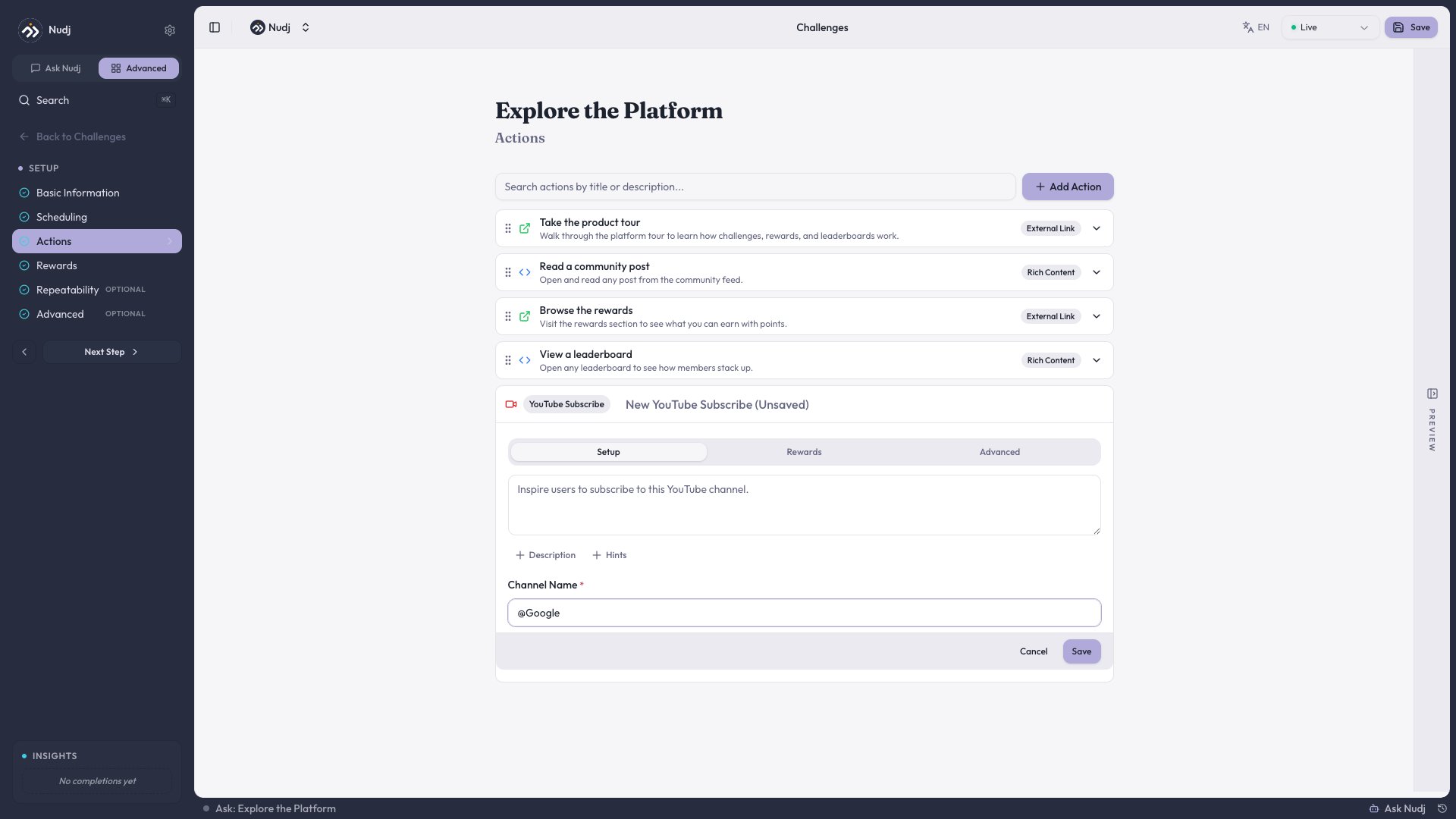
### YouTube Subscribe
Enhanced **YouTube channel input** (#1180) lets you paste any YouTube URL — channel, video, or shorts — and Nudj resolves the canonical channel ID. The action prompts members to subscribe.
 ***
## Creating in the creator wizard
The Nudj Agent can draft a YouTube action directly (#1085). Ask it *"add a YouTube subscribe action for our channel"* and it resolves the channel, fills metadata, and drops the action into the current challenge draft.
***
## Video-driven challenges
Actions can be layered on top of a single video — timestamp-based questions, mid-video polls, completion checkpoints. The admin UI was purpose-built for this pattern (#1138, #1114, #944). See [Video Challenges](/admin-guide/challenges/video-challenges) for the walkthrough.
***
## Examples
One challenge with three actions: (1) watch the launch video, (2) subscribe to the channel, (3) share the channel link. Reward = 150 points + limited-edition badge.
Five challenges, each with a video-watch action + a quiz question at the end. Uses [Complete Achievement](/admin-guide/achievements/achievements-as-actions) to gate the next challenge behind finishing the previous.
***
## Creating in the creator wizard
The Nudj Agent can draft a YouTube action directly (#1085). Ask it *"add a YouTube subscribe action for our channel"* and it resolves the channel, fills metadata, and drops the action into the current challenge draft.
***
## Video-driven challenges
Actions can be layered on top of a single video — timestamp-based questions, mid-video polls, completion checkpoints. The admin UI was purpose-built for this pattern (#1138, #1114, #944). See [Video Challenges](/admin-guide/challenges/video-challenges) for the walkthrough.
***
## Examples
One challenge with three actions: (1) watch the launch video, (2) subscribe to the channel, (3) share the channel link. Reward = 150 points + limited-edition badge.
Five challenges, each with a video-watch action + a quiz question at the end. Uses [Complete Achievement](/admin-guide/achievements/achievements-as-actions) to gate the next challenge behind finishing the previous.