> ## Documentation Index
> Fetch the complete documentation index at: https://docs.nudj.cx/llms.txt
> Use this file to discover all available pages before exploring further.
# Featured & Scheduled Posts
> Feature posts into the carousel, schedule with start and end dates, and understand post statuses
Posts can be **featured** (surfaced in the featured carousel) or **scheduled** (published at a future time). Both are configured in the post studio (#1123, #1963).
## Featuring a post
Toggle **Featured** on in the studio's **Basic Information** step (#1930), or from the star icon on the posts list.
Featured posts are pulled into a member-facing **featured posts carousel**, a swipeable row of posts shown alongside the feed. It's posts only, not a mixed row of challenges and rewards.
**You can feature as many posts as you like.** Featuring a post does *not* unfeature the others. `featured` is an independent flag per post. The carousel fetches up to **5** featured posts, so a sixth featured post won't appear until one ahead of it drops out.
**Rotate featured posts.** Because nothing auto-unfeatures, old featured posts stay featured forever until you turn them off. Audit the featured set periodically or the carousel fills with stale content and new posts never surface.
***
## Scheduling
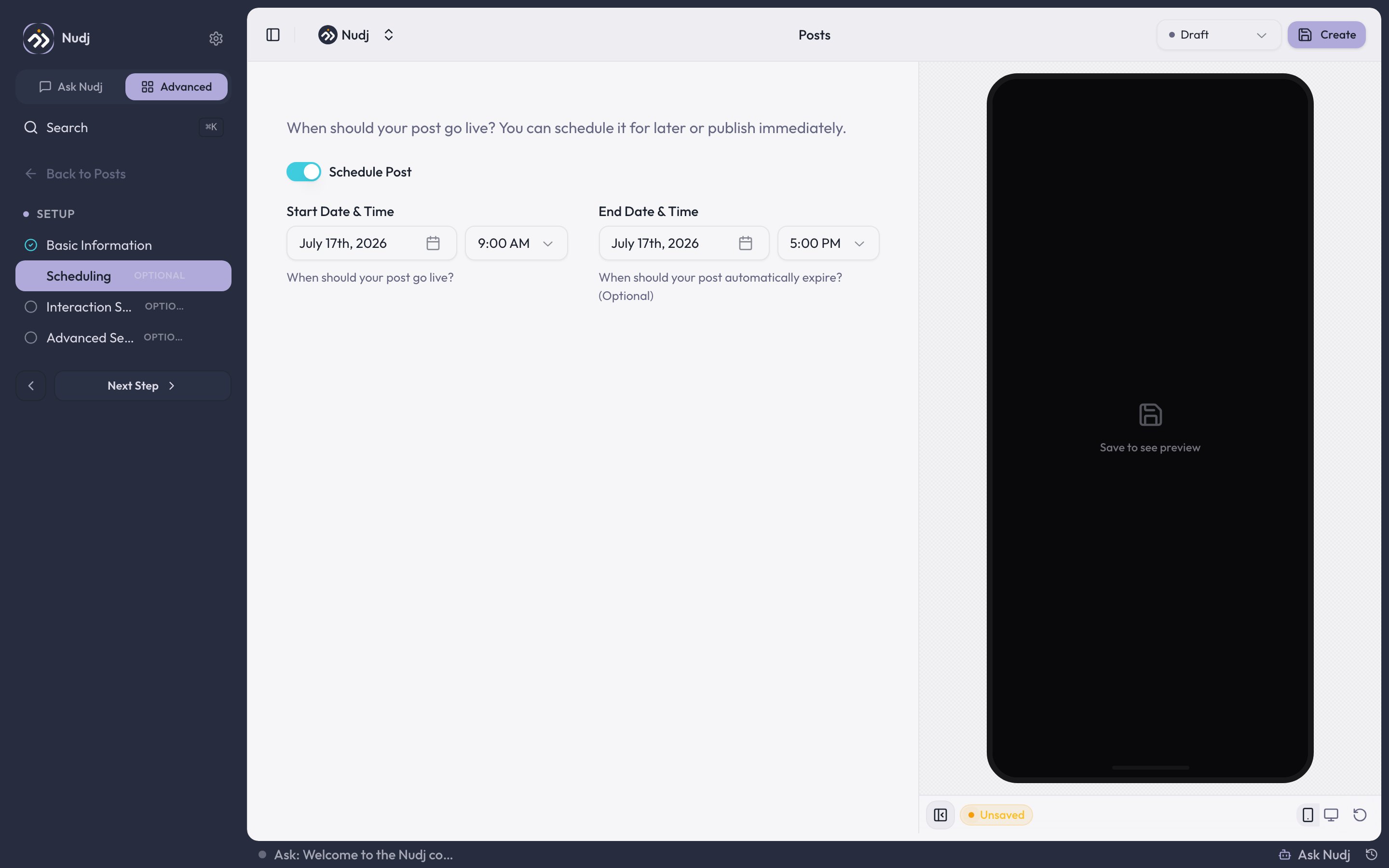 In the studio's **Scheduling** step, turn on **Schedule Post**:
* **Start Date & Time**: when the post goes live. A future start date puts the post in **Scheduled**; at the start time it flips to **Live**.
* **End Date & Time** *(optional)*: when the post comes down. Leave it empty and a live post runs **live indefinitely**.
The end-date calendar greys out every day before your chosen start date. That guard works by day, not by time, so a same-day end time that's earlier than the start time can still be typed in. Saving catches it with a "start date must be before end date" error.
A **Live** post can't have a future start date. Set a future date and you'll be asked to use **Scheduled** instead. This prevents accidental early publishes.
***
## Post statuses
| Status | Meaning |
| ------------- | -------------------------------------------------------------- |
| **Draft** | Not visible to members. The default for a new post. |
| **Scheduled** | Has a future start date; goes Live automatically at that time. |
| **Live** | Visible in the member feed. |
| **Expired** | Past its end date. No longer visible to members. |
| **Archived** | Retired by hand; hidden from the feed. |
The posts list shows counts for **Total Posts**, **Published**, **Draft**, and **Scheduled**, and lets you filter by status.
A **Scheduled** post is flipped to **Live** by a background job at its start time, so you don't need to keep the tab open or publish it by hand.
***
## Pairing featured posts with content
Featured posts are most effective when paired with actionable content:
* Featured post announces a new challenge -> challenge links from the post.
* Featured post introduces a new reward -> member sees and taps to check out the reward.
* Featured post for a time-limited event -> urgency + one-click CTA.
***
## Best practices
Use an **end date** for time-limited announcements (an event, a sale). The post expires on its own instead of needing a manual cleanup pass.
Use scheduled posts to **time content with timezones**. 8am local time in your biggest region is usually the engagement sweet spot.
See [Creating Posts](/admin-guide/posts/creating-posts) for the full studio flow.
In the studio's **Scheduling** step, turn on **Schedule Post**:
* **Start Date & Time**: when the post goes live. A future start date puts the post in **Scheduled**; at the start time it flips to **Live**.
* **End Date & Time** *(optional)*: when the post comes down. Leave it empty and a live post runs **live indefinitely**.
The end-date calendar greys out every day before your chosen start date. That guard works by day, not by time, so a same-day end time that's earlier than the start time can still be typed in. Saving catches it with a "start date must be before end date" error.
A **Live** post can't have a future start date. Set a future date and you'll be asked to use **Scheduled** instead. This prevents accidental early publishes.
***
## Post statuses
| Status | Meaning |
| ------------- | -------------------------------------------------------------- |
| **Draft** | Not visible to members. The default for a new post. |
| **Scheduled** | Has a future start date; goes Live automatically at that time. |
| **Live** | Visible in the member feed. |
| **Expired** | Past its end date. No longer visible to members. |
| **Archived** | Retired by hand; hidden from the feed. |
The posts list shows counts for **Total Posts**, **Published**, **Draft**, and **Scheduled**, and lets you filter by status.
A **Scheduled** post is flipped to **Live** by a background job at its start time, so you don't need to keep the tab open or publish it by hand.
***
## Pairing featured posts with content
Featured posts are most effective when paired with actionable content:
* Featured post announces a new challenge -> challenge links from the post.
* Featured post introduces a new reward -> member sees and taps to check out the reward.
* Featured post for a time-limited event -> urgency + one-click CTA.
***
## Best practices
Use an **end date** for time-limited announcements (an event, a sale). The post expires on its own instead of needing a manual cleanup pass.
Use scheduled posts to **time content with timezones**. 8am local time in your biggest region is usually the engagement sweet spot.
See [Creating Posts](/admin-guide/posts/creating-posts) for the full studio flow.