> ## Documentation Index
> Fetch the complete documentation index at: https://docs.nudj.cx/llms.txt
> Use this file to discover all available pages before exploring further.
# Reward Advanced Features
> The Advanced Settings step, reward statuses and scheduling, cross-community rewards, supply sharing, and who can do what
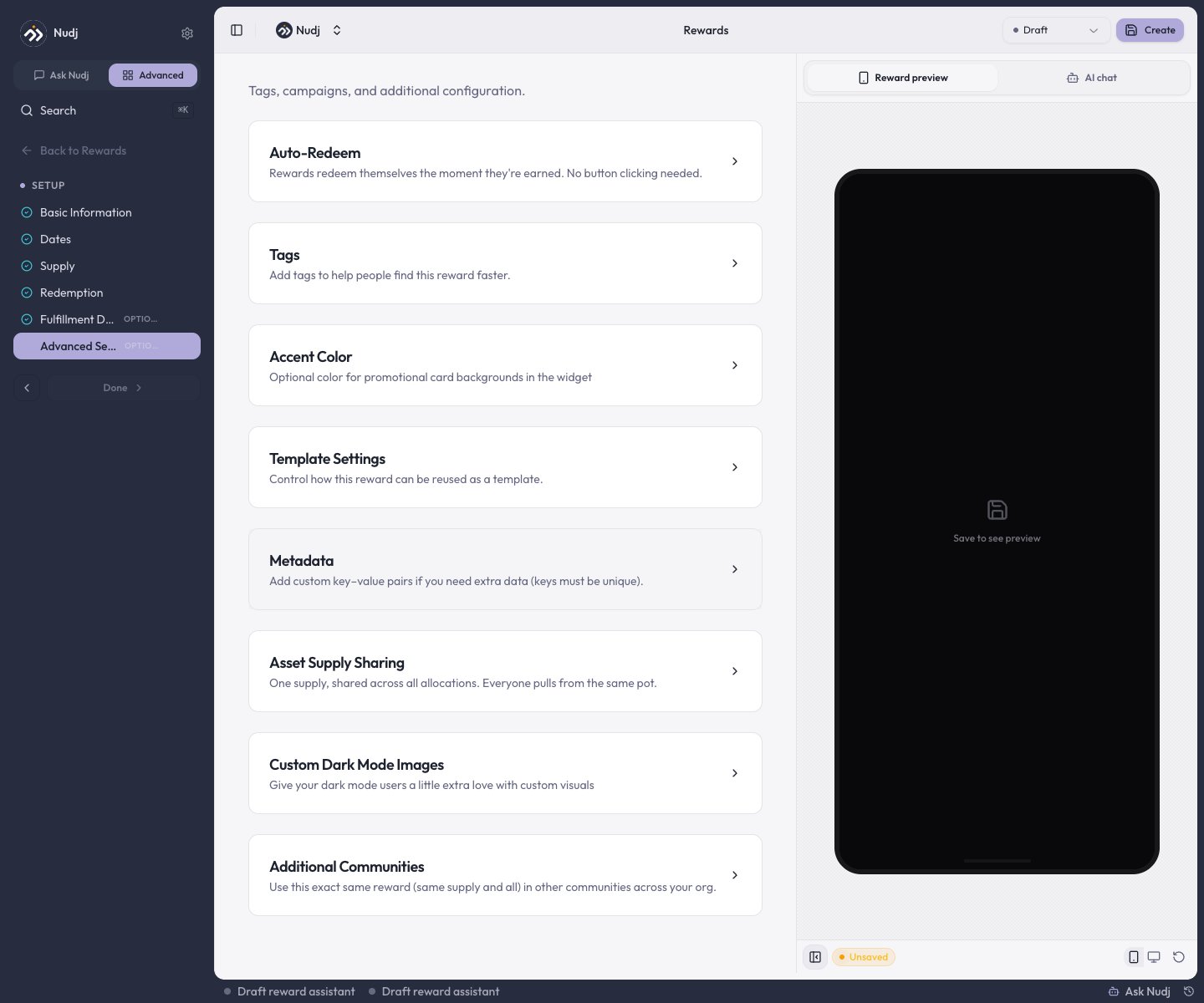
The optional **Advanced Settings** step holds the long-tail configuration most rewards never need. This page covers those sections plus the advanced concepts that live elsewhere: statuses and scheduling, defaults, and role permissions.
 ## Auto-Redeem
"Rewards redeem themselves the moment they're earned. No button clicking needed." Turn it on for instant-value rewards where a claim step is friction.
* Applies to **asset** rewards when the asset is earned or bought.
* **Badges and boosts force it on** (their card is hidden - it's how they auto-award).
* Auto-redeem **silently skips** if the reward collects [fulfilment details](/admin-guide/rewards/redemption-and-fulfilment) - those need the member's input at redemption.
* **Giveaway prizes don't auto-redeem**: winners claim their won reward from the wallet themselves.
***
## Tags, Accent Color, and Metadata
* **Tags** - organisation-scoped labels for filtering and reporting.
* **Accent Color** - an optional color for the reward's promotional card backgrounds in the widget.
* **Metadata** - custom key-value pairs (unique keys) for anything you want exposed to integrations and webhooks.
***
## Asset Supply Sharing
"One supply, shared across all allocations. Everyone pulls from the same pot." With **Shared Asset Supply** on, the reward keeps a single supply pool no matter how many ways it distributes (challenges, shop, gifts) instead of a separate cap per allocation. Shown for asset-based rewards only.
***
## Additional Communities
"Use this exact same reward (same supply and all) in other communities across your org." Pick extra communities and the **same reward document** - including its one supply pool - serves all of them.
In the additional communities the reward is **read-only**: to edit it, open it from the community it was created in (the form shows a banner pointing you there).
***
## Custom Dark Mode Images
**Don't use this section on rewards yet.** The separate dark-mode upload is currently disabled here, so the control writes to the **same field as the main reward image** - uploading a "dark mode image" replaces your reward image instead of adding a dark variant. Rewards use one image for both themes for now; leave this section alone until it's fixed.
***
## Template Settings
"Control how this reward can be reused as a template." Choose which organisations may create copies from it via **Available to Organisations**; the original is never modified by copies. Super admins additionally get a **Global Template** toggle that opens it to every organisation at once.
***
## Statuses and scheduling
A reward's lifecycle is its [status](/admin-guide/rewards/creating-regular-rewards#reward-status): **Draft** (hidden while you build), **Live**, **Scheduled** (goes Live automatically at its start date), **Archived** (retired, kept for records), and **Expired**. Draft and Archived rewards are never shown to members.
There is no per-attachment scheduling on challenges - timing is controlled on the **reward** itself. Status compatibility keeps combinations sane when attaching a reward to a challenge:
| Challenge status | Accepts rewards that are |
| ---------------- | ------------------------- |
| Live | Live only |
| Scheduled | Scheduled or Live |
| Draft | Draft, Scheduled, or Live |
So for a staged launch, attach a **Scheduled** reward to a Draft or Scheduled challenge and both flip Live on their start dates.
There is also no "delete" for rewards - retire a reward by setting it to **Archived**.
***
## Gifting-only rewards
There's no "manual distribution" toggle. To make a reward admin-gifted only, simply **don't attach it** to any challenge or the shop, and hand it out via [Gift Rewards](/admin-guide/rewards/reward-gifting). Gifts still consume the reward's supply and respect its per-user cap.
***
## Defaults quick reference
A new Regular reward starts with:
| Setting | Default |
| -------------------------------- | ------------------------------------- |
| Status | Draft |
| Earning window | Today, for 7 days |
| Total supply | Unlimited |
| Max per user | 1 |
| Max entries per user (giveaways) | 5 |
| Auto-redeem | Off (on and locked for badges/boosts) |
***
## Who can do what
| Role | Rewards |
| ------------------ | ------------------------------------------------ |
| Viewer | View only |
| Moderator | View only |
| Manager | Create, edit, archive, run manual giveaway draws |
| Admin / SuperAdmin | Everything, including gifting |
**Gifting is Admin-and-above** - it awards currency alongside assets, which Managers can't create. Viewers see reward pages in a read-only state.
***
## Next steps
The studio walkthrough, including the status dropdown.
Hand-deliver rewards to specific members.
Auto-redeem vs manual claiming in practice.
Draw mechanics and winner selection.
## Auto-Redeem
"Rewards redeem themselves the moment they're earned. No button clicking needed." Turn it on for instant-value rewards where a claim step is friction.
* Applies to **asset** rewards when the asset is earned or bought.
* **Badges and boosts force it on** (their card is hidden - it's how they auto-award).
* Auto-redeem **silently skips** if the reward collects [fulfilment details](/admin-guide/rewards/redemption-and-fulfilment) - those need the member's input at redemption.
* **Giveaway prizes don't auto-redeem**: winners claim their won reward from the wallet themselves.
***
## Tags, Accent Color, and Metadata
* **Tags** - organisation-scoped labels for filtering and reporting.
* **Accent Color** - an optional color for the reward's promotional card backgrounds in the widget.
* **Metadata** - custom key-value pairs (unique keys) for anything you want exposed to integrations and webhooks.
***
## Asset Supply Sharing
"One supply, shared across all allocations. Everyone pulls from the same pot." With **Shared Asset Supply** on, the reward keeps a single supply pool no matter how many ways it distributes (challenges, shop, gifts) instead of a separate cap per allocation. Shown for asset-based rewards only.
***
## Additional Communities
"Use this exact same reward (same supply and all) in other communities across your org." Pick extra communities and the **same reward document** - including its one supply pool - serves all of them.
In the additional communities the reward is **read-only**: to edit it, open it from the community it was created in (the form shows a banner pointing you there).
***
## Custom Dark Mode Images
**Don't use this section on rewards yet.** The separate dark-mode upload is currently disabled here, so the control writes to the **same field as the main reward image** - uploading a "dark mode image" replaces your reward image instead of adding a dark variant. Rewards use one image for both themes for now; leave this section alone until it's fixed.
***
## Template Settings
"Control how this reward can be reused as a template." Choose which organisations may create copies from it via **Available to Organisations**; the original is never modified by copies. Super admins additionally get a **Global Template** toggle that opens it to every organisation at once.
***
## Statuses and scheduling
A reward's lifecycle is its [status](/admin-guide/rewards/creating-regular-rewards#reward-status): **Draft** (hidden while you build), **Live**, **Scheduled** (goes Live automatically at its start date), **Archived** (retired, kept for records), and **Expired**. Draft and Archived rewards are never shown to members.
There is no per-attachment scheduling on challenges - timing is controlled on the **reward** itself. Status compatibility keeps combinations sane when attaching a reward to a challenge:
| Challenge status | Accepts rewards that are |
| ---------------- | ------------------------- |
| Live | Live only |
| Scheduled | Scheduled or Live |
| Draft | Draft, Scheduled, or Live |
So for a staged launch, attach a **Scheduled** reward to a Draft or Scheduled challenge and both flip Live on their start dates.
There is also no "delete" for rewards - retire a reward by setting it to **Archived**.
***
## Gifting-only rewards
There's no "manual distribution" toggle. To make a reward admin-gifted only, simply **don't attach it** to any challenge or the shop, and hand it out via [Gift Rewards](/admin-guide/rewards/reward-gifting). Gifts still consume the reward's supply and respect its per-user cap.
***
## Defaults quick reference
A new Regular reward starts with:
| Setting | Default |
| -------------------------------- | ------------------------------------- |
| Status | Draft |
| Earning window | Today, for 7 days |
| Total supply | Unlimited |
| Max per user | 1 |
| Max entries per user (giveaways) | 5 |
| Auto-redeem | Off (on and locked for badges/boosts) |
***
## Who can do what
| Role | Rewards |
| ------------------ | ------------------------------------------------ |
| Viewer | View only |
| Moderator | View only |
| Manager | Create, edit, archive, run manual giveaway draws |
| Admin / SuperAdmin | Everything, including gifting |
**Gifting is Admin-and-above** - it awards currency alongside assets, which Managers can't create. Viewers see reward pages in a read-only state.
***
## Next steps
The studio walkthrough, including the status dropdown.
Hand-deliver rewards to specific members.
Auto-redeem vs manual claiming in practice.
Draw mechanics and winner selection.