> ## Documentation Index
> Fetch the complete documentation index at: https://docs.nudj.cx/llms.txt
> Use this file to discover all available pages before exploring further.
# Badges
> Collectible emblems members earn once and keep: the 3-step badge wizard, award paths, and where badges display
Badges are collectible emblems members **earn once and keep**. There's nothing to redeem: the moment a badge is earned it lands in the member's collection, no codes or claim step involved.
## Creating a badge
Pick **Badge** in the [type picker](/admin-guide/rewards/reward-types). Because badges have nothing to supply, redeem, or fulfil, the wizard slims to **three steps**:
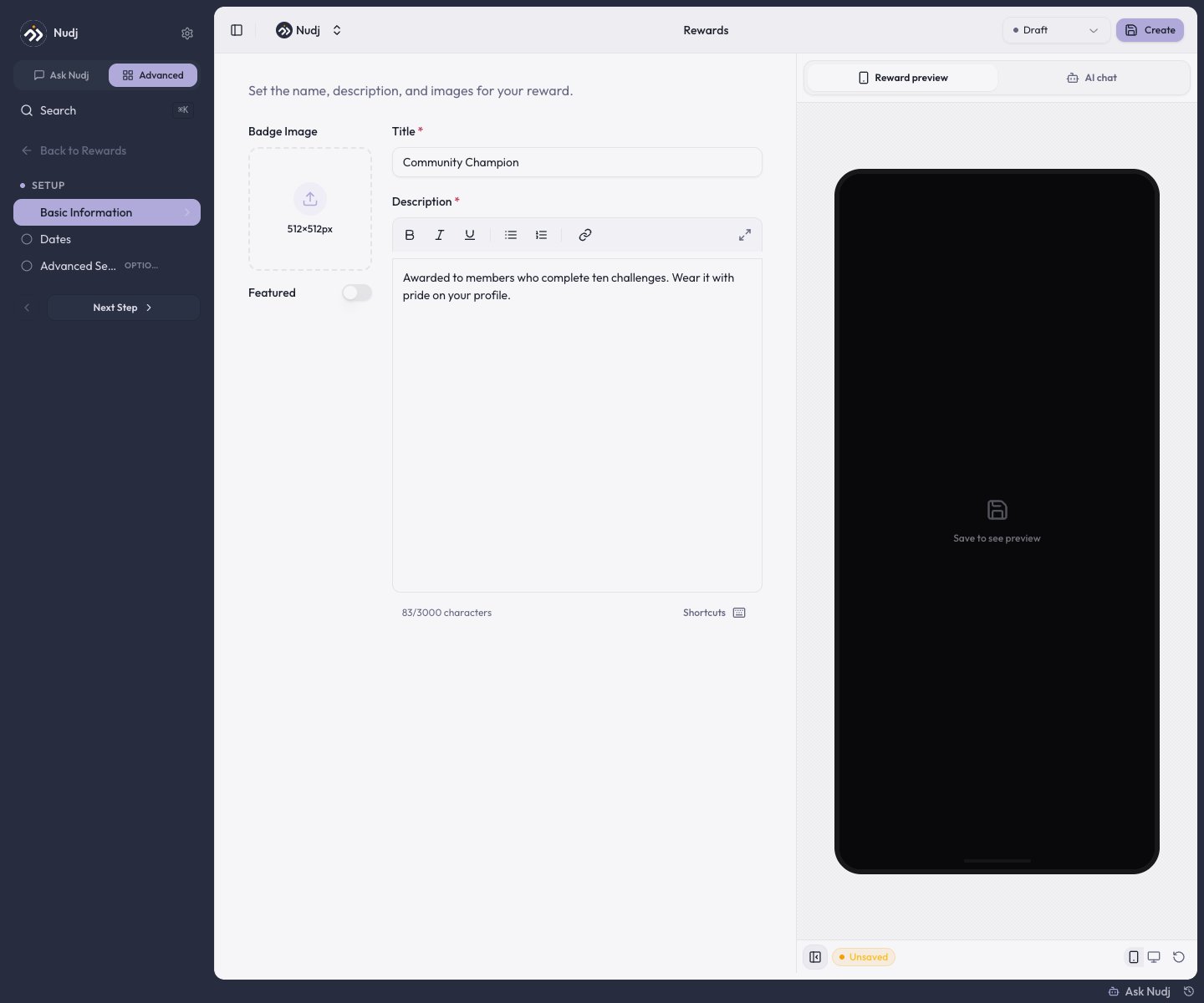 **Badge Image** (1:1 aspect ratio, ideally **512 x 512px**, cropped as a rounded square), plus the required title and description. PNG, JPG, GIF, or WebP. The **Featured** toggle is available; Spotlight isn't (badges award themselves, so there's nothing to spotlight for claiming).
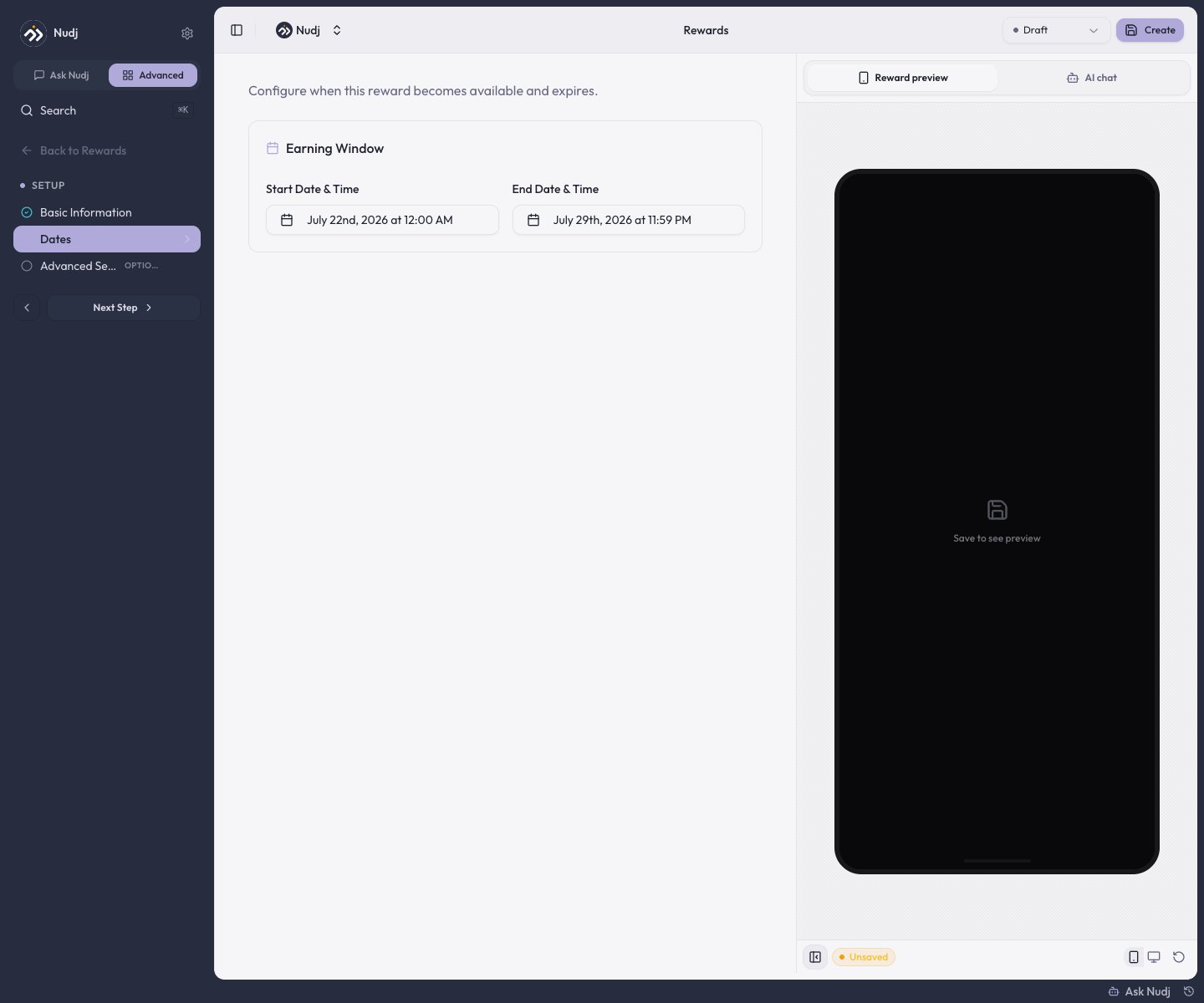
Just the **Earning Window** (start and end). No redeem-by deadline exists for badges.
Tags, accent color, template settings, metadata, and a dark-mode image variant.
**Badge Image** (1:1 aspect ratio, ideally **512 x 512px**, cropped as a rounded square), plus the required title and description. PNG, JPG, GIF, or WebP. The **Featured** toggle is available; Spotlight isn't (badges award themselves, so there's nothing to spotlight for claiming).
Just the **Earning Window** (start and end). No redeem-by deadline exists for badges.
Tags, accent color, template settings, metadata, and a dark-mode image variant.
 Supply is handled for you: badges are created with **unlimited supply, capped at one per member**. Rarity comes from how hard the badge is to earn, not from scarcity.
***
## How members earn a badge
* **Challenges** - attach the badge on a challenge's **Distribution** step.
* **Achievements** - the classic path: attach it on an achievement's **Rewards** step so it marks a milestone.
* **The shop** - badges can be listed in the [Reward Store](/admin-guide/rewards/shop-integration) for a points price (quantity is fixed at one).
* **Gifting** - hand one to specific members via [Gift Rewards](/admin-guide/rewards/reward-gifting).
However it's earned, the badge **auto-awards instantly** - the member sees it in their collection right away.
**Live badges aren't secret.** Members can see every live badge as a locked, grayscale entry in their profile and wallet galleries before earning it. That's great for aspiration, but don't publish a surprise badge until you want it teased.
***
## Where badges display
* The member **profile page** (badges carousel) and the dedicated **Badges** page in the member app.
* The **widget profile drawer**: an earned/total count plus a badge grid, with unearned badges in grayscale.
* The **widget wallet** has a badges section and filter.
* Earning a badge from a challenge triggers a **badge unlock celebration** in the completion flow.
Give badges clear, descriptive titles - the title doubles as the image's screen-reader text, and it's the label members see everywhere the badge appears.
***
## Badge analytics
A badge's **Stats** page works like any reward's: the Overview shows the claim funnel and a **Claims Timeline**, the **Users** tab lists every holder, and the config chips mark it as a **Digital Badge**. (A Fulfilment tab renders too, but badges never collect fulfilment details, so it stays empty.)
***
## Tiered badge design
Create a series of escalating badges to give members a ladder to climb:
| Tier | Example |
| ------ | --------------------------------------- |
| Bronze | "Newcomer" - first challenge completed |
| Silver | "Regular" - ten challenges completed |
| Gold | "Champion" - fifty challenges completed |
Use [achievements as actions](/admin-guide/achievements/achievements-as-actions) to gate each tier behind the previous one.
***
## Next steps
Badges next to the other four types.
The natural home for badge rewards.
Sell badges for points.
Track who's earned what.
Supply is handled for you: badges are created with **unlimited supply, capped at one per member**. Rarity comes from how hard the badge is to earn, not from scarcity.
***
## How members earn a badge
* **Challenges** - attach the badge on a challenge's **Distribution** step.
* **Achievements** - the classic path: attach it on an achievement's **Rewards** step so it marks a milestone.
* **The shop** - badges can be listed in the [Reward Store](/admin-guide/rewards/shop-integration) for a points price (quantity is fixed at one).
* **Gifting** - hand one to specific members via [Gift Rewards](/admin-guide/rewards/reward-gifting).
However it's earned, the badge **auto-awards instantly** - the member sees it in their collection right away.
**Live badges aren't secret.** Members can see every live badge as a locked, grayscale entry in their profile and wallet galleries before earning it. That's great for aspiration, but don't publish a surprise badge until you want it teased.
***
## Where badges display
* The member **profile page** (badges carousel) and the dedicated **Badges** page in the member app.
* The **widget profile drawer**: an earned/total count plus a badge grid, with unearned badges in grayscale.
* The **widget wallet** has a badges section and filter.
* Earning a badge from a challenge triggers a **badge unlock celebration** in the completion flow.
Give badges clear, descriptive titles - the title doubles as the image's screen-reader text, and it's the label members see everywhere the badge appears.
***
## Badge analytics
A badge's **Stats** page works like any reward's: the Overview shows the claim funnel and a **Claims Timeline**, the **Users** tab lists every holder, and the config chips mark it as a **Digital Badge**. (A Fulfilment tab renders too, but badges never collect fulfilment details, so it stays empty.)
***
## Tiered badge design
Create a series of escalating badges to give members a ladder to climb:
| Tier | Example |
| ------ | --------------------------------------- |
| Bronze | "Newcomer" - first challenge completed |
| Silver | "Regular" - ten challenges completed |
| Gold | "Champion" - fifty challenges completed |
Use [achievements as actions](/admin-guide/achievements/achievements-as-actions) to gate each tier behind the previous one.
***
## Next steps
Badges next to the other four types.
The natural home for badge rewards.
Sell badges for points.
Track who's earned what.