> ## Documentation Index
> Fetch the complete documentation index at: https://docs.nudj.cx/llms.txt
> Use this file to discover all available pages before exploring further.
# Creating Rewards
> The reward studio, step by step: basic information, dates, supply, redemption, fulfillment, and advanced settings
Rewards use the same **studio layout** as challenges, achievements, and posts: a step sidebar on the left, the form in the middle, and a live preview on the right.
## Start a reward
**Engagement -> Rewards -> Create Reward** (or the top-nav **New -> Reward** menu item) opens the reward flow. You first land on the **template library** - pick a template, or choose **Create blank** to open the type picker.

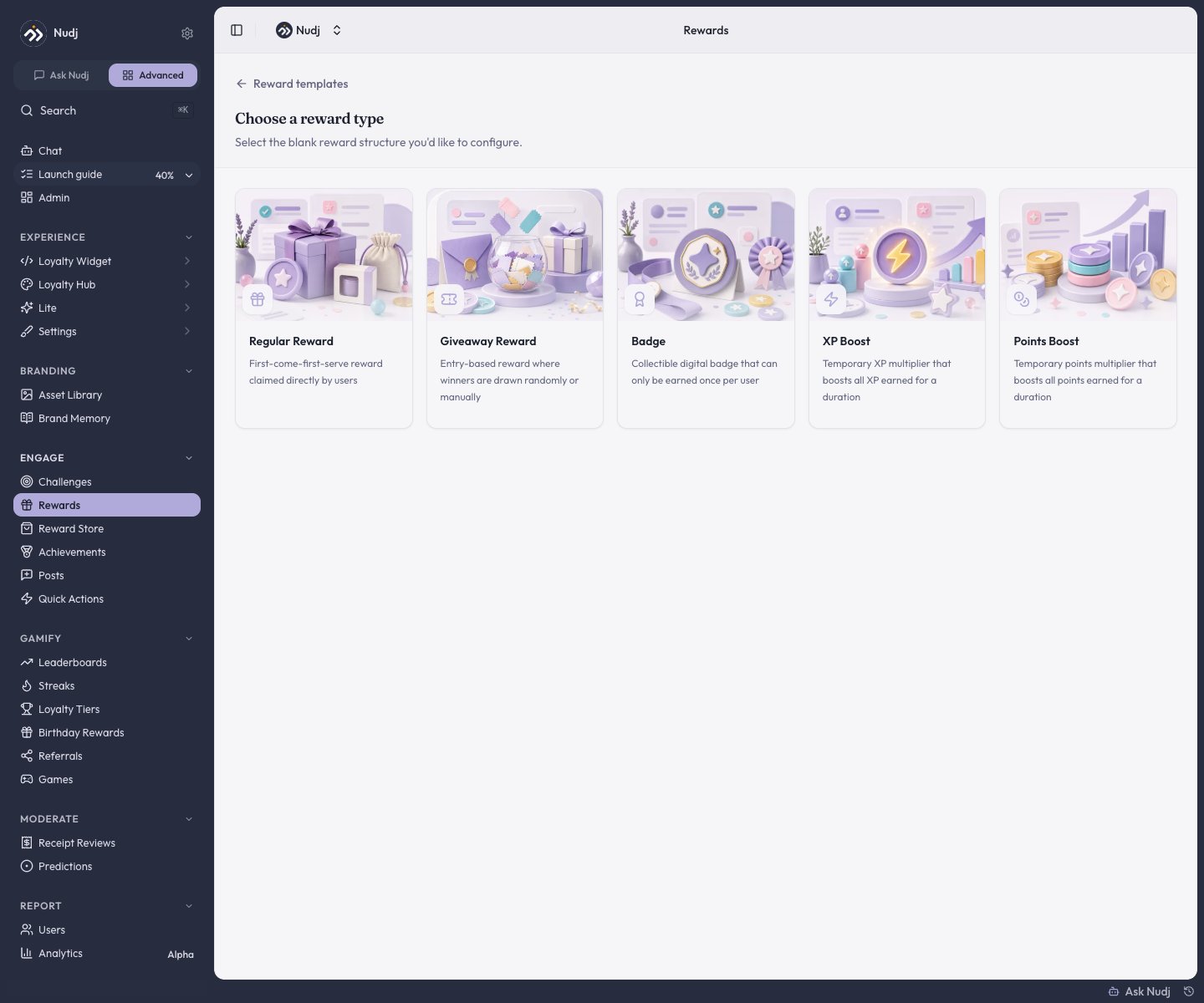 There are **five** blank types - the picker scrolls to show them all:
| Type | What it is |
| ------------------- | --------------------------------------------------------------------------------------------------------------- |
| **Regular Reward** | Claimable with points or requirements. Discounts, merch, digital goods. |
| **Giveaway Reward** | A prize draw - winners picked randomly or by hand. See [Giveaways](/admin-guide/rewards/sweepstakes-giveaways). |
| **Badge** | A collectible emblem for achievements or milestones. See [Badges](/admin-guide/rewards/badges). |
| **XP Boost** | An effect that multiplies a member's XP for a set time. |
| **Points Boost** | An effect that multiplies a member's points for a set time. |
Once you pick a type it's **locked in** - you can't change a reward's type after creation.
The type you pick changes which steps appear. **Badge**, **XP Boost**, and **Points Boost** rewards have nothing to supply, no redemption format, and nothing to fulfil, so they skip the Supply, Redemption, and Fulfillment Details steps. XP and Points Boosts add their own **XP Boost Config** / **Points Boost Config** step instead.
***
## The steps
A **Regular** or **Giveaway** reward has **six** steps. Only the first four are required; the last two are optional and can be left at their defaults. Move through them with the **Next Step** button in the sidebar - on the final step it reads **Done**.
Reward image, title, and description. **Required.**
The earning window and the redeem-by deadline. **Required.**
How many exist and how many each member can claim. **Required.**
How members actually claim the reward. **Required.**
Optional info collected from members at redemption (size, address, etc.).
Auto-redeem, tags, metadata, cross-community scope, and more.
The top bar keeps a **status** dropdown (starting on **Draft**) next to the **Create** button.
***
## Basic Information
There are **five** blank types - the picker scrolls to show them all:
| Type | What it is |
| ------------------- | --------------------------------------------------------------------------------------------------------------- |
| **Regular Reward** | Claimable with points or requirements. Discounts, merch, digital goods. |
| **Giveaway Reward** | A prize draw - winners picked randomly or by hand. See [Giveaways](/admin-guide/rewards/sweepstakes-giveaways). |
| **Badge** | A collectible emblem for achievements or milestones. See [Badges](/admin-guide/rewards/badges). |
| **XP Boost** | An effect that multiplies a member's XP for a set time. |
| **Points Boost** | An effect that multiplies a member's points for a set time. |
Once you pick a type it's **locked in** - you can't change a reward's type after creation.
The type you pick changes which steps appear. **Badge**, **XP Boost**, and **Points Boost** rewards have nothing to supply, no redemption format, and nothing to fulfil, so they skip the Supply, Redemption, and Fulfillment Details steps. XP and Points Boosts add their own **XP Boost Config** / **Points Boost Config** step instead.
***
## The steps
A **Regular** or **Giveaway** reward has **six** steps. Only the first four are required; the last two are optional and can be left at their defaults. Move through them with the **Next Step** button in the sidebar - on the final step it reads **Done**.
Reward image, title, and description. **Required.**
The earning window and the redeem-by deadline. **Required.**
How many exist and how many each member can claim. **Required.**
How members actually claim the reward. **Required.**
Optional info collected from members at redemption (size, address, etc.).
Auto-redeem, tags, metadata, cross-community scope, and more.
The top bar keeps a **status** dropdown (starting on **Draft**) next to the **Create** button.
***
## Basic Information
 **Title** and **Description** are both required (each marked with a red asterisk). Description is a rich-text editor - at least 10 characters, up to **3,000** - and the toolbar's **expand** icon opens a larger fullscreen editor.
Click the **Reward Image** tile to open the image picker (best results at **1440x1080px**). It has three tabs: **Library** (assets already in your community or organisation), **Upload New**, and **Image Gen AI**.
The left column also has a **Featured** toggle (surfaces the reward prominently in the member app) and, on manually-claimed rewards, a **Spotlight** toggle. Auto-redeeming rewards like badges and boosts hide Spotlight. Shop availability is set later, in the [Supply](#supply) step.
Tags, metadata, and the accent colour are **not** on this step - they live under [Advanced Settings](#advanced-settings). The content-language switcher appears in the sidebar only after the reward is saved.
***
## Dates
**Title** and **Description** are both required (each marked with a red asterisk). Description is a rich-text editor - at least 10 characters, up to **3,000** - and the toolbar's **expand** icon opens a larger fullscreen editor.
Click the **Reward Image** tile to open the image picker (best results at **1440x1080px**). It has three tabs: **Library** (assets already in your community or organisation), **Upload New**, and **Image Gen AI**.
The left column also has a **Featured** toggle (surfaces the reward prominently in the member app) and, on manually-claimed rewards, a **Spotlight** toggle. Auto-redeeming rewards like badges and boosts hide Spotlight. Shop availability is set later, in the [Supply](#supply) step.
Tags, metadata, and the accent colour are **not** on this step - they live under [Advanced Settings](#advanced-settings). The content-language switcher appears in the sidebar only after the reward is saved.
***
## Dates
 * **Earning Window** - a **Start Date & Time** (when members can begin earning) and an **End Date & Time** (when earning closes). Members who earned the reward before the window closes keep it and can still redeem it.
* **Use-It-or-Lose-It Date** - the redeem-by deadline (required). After this date, any **unredeemed** reward expires, no matter how the member got it.
* **Redemption Viewing Window** - how long a member can still view their code or details after redeeming (preset durations or custom).
For a **Giveaway**, this step relabels to the entries-open / entries-close window and adds the **draw date** and winner-selection method.
***
## Supply
* **Earning Window** - a **Start Date & Time** (when members can begin earning) and an **End Date & Time** (when earning closes). Members who earned the reward before the window closes keep it and can still redeem it.
* **Use-It-or-Lose-It Date** - the redeem-by deadline (required). After this date, any **unredeemed** reward expires, no matter how the member got it.
* **Redemption Viewing Window** - how long a member can still view their code or details after redeeming (preset durations or custom).
For a **Giveaway**, this step relabels to the entries-open / entries-close window and adds the **draw date** and winner-selection method.
***
## Supply
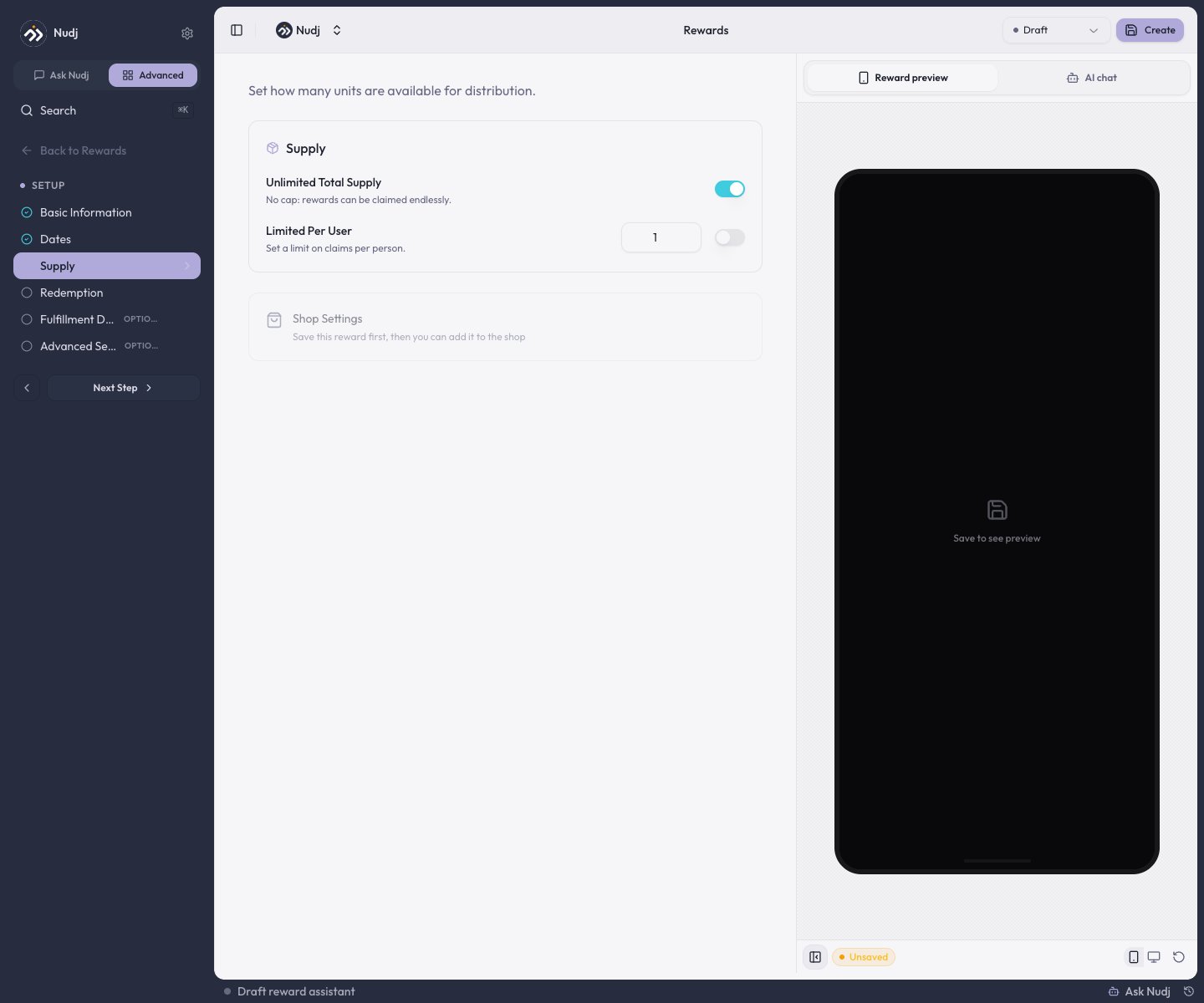 * **Unlimited Total Supply** - on by default (no cap). Turn it off to set a hard limit on how many can ever be claimed.
* **Limited Per User** - cap how many one member can claim.
For a **Giveaway**, this step instead sets the **number of winners**, **max wins per user**, total **entries** supply, and **max entries per user**.
A reward's **Shop Settings** also live here, but the button is disabled until the reward is saved (it needs an ID first). Save the reward, then open Shop Settings to set a point price. See [The Reward Store](/admin-guide/rewards/shop-integration).
***
## Redemption
Choose a **Display Mode**: a polished **Text-Based Message** or scannable **Code-Based Redemption**.
* **Unlimited Total Supply** - on by default (no cap). Turn it off to set a hard limit on how many can ever be claimed.
* **Limited Per User** - cap how many one member can claim.
For a **Giveaway**, this step instead sets the **number of winners**, **max wins per user**, total **entries** supply, and **max entries per user**.
A reward's **Shop Settings** also live here, but the button is disabled until the reward is saved (it needs an ID first). Save the reward, then open Shop Settings to set a point price. See [The Reward Store](/admin-guide/rewards/shop-integration).
***
## Redemption
Choose a **Display Mode**: a polished **Text-Based Message** or scannable **Code-Based Redemption**.
 Switch to **Code-Based Redemption** to hand out codes in one of four formats - **Text Code**, **Link**, **Barcode**, or **QR Code** - and decide whether everyone shares **one code** or **each user gets their own** from an uploaded list.
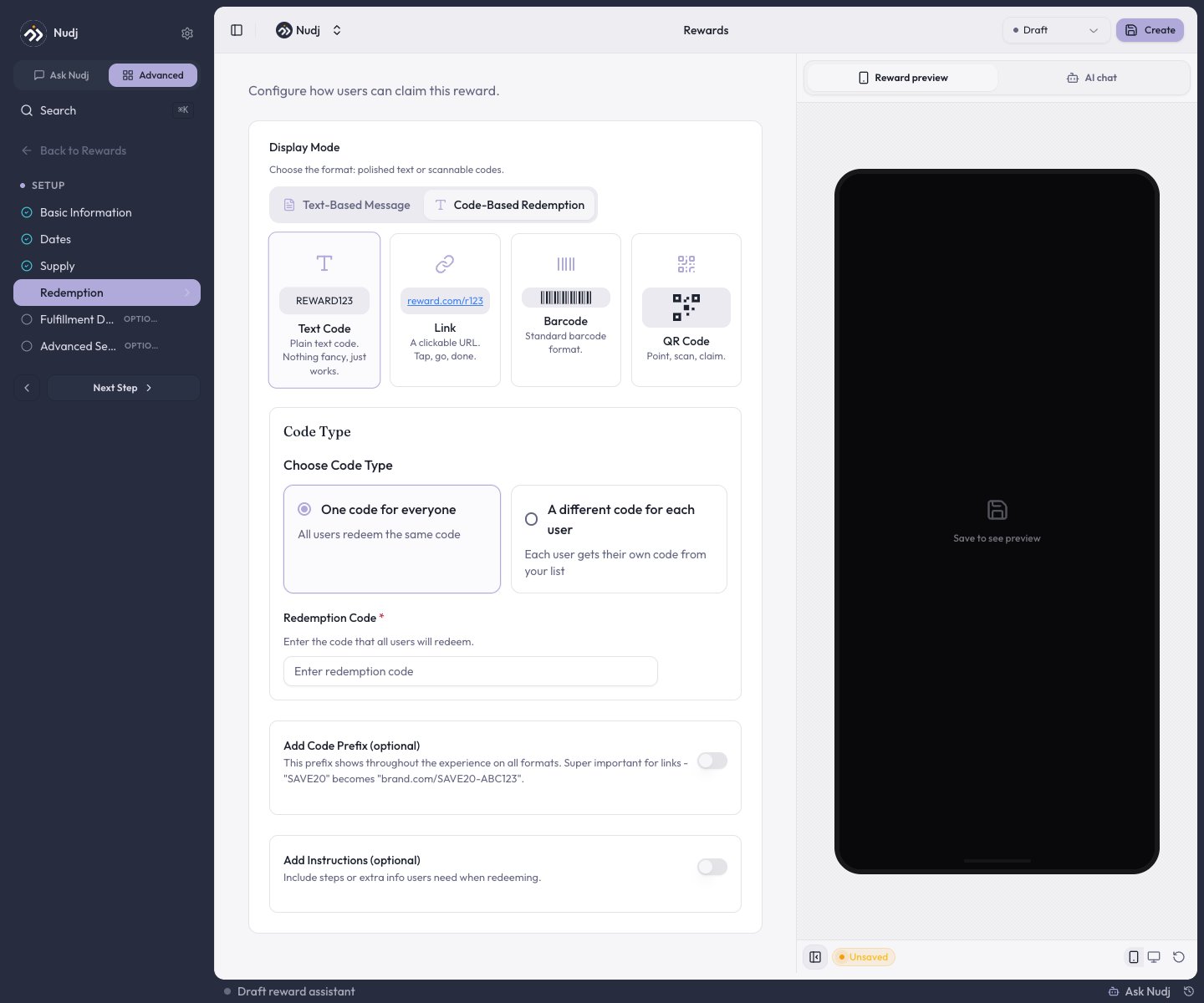 Two optional extras sit below: **Add Code Prefix** (prepended to every code - turns `SAVE20` into `brand.com/SAVE20-ABC123` for links) and **Add Instructions** (extra steps members see when redeeming).
For a per-user code list, paste or CSV-upload up to **500,000 codes** (max 100 characters each). Re-uploads merge with the existing list and drop duplicates. Keep your own backup - Nudj stores codes but doesn't expose an export.
***
## Fulfillment Details
Two optional extras sit below: **Add Code Prefix** (prepended to every code - turns `SAVE20` into `brand.com/SAVE20-ABC123` for links) and **Add Instructions** (extra steps members see when redeeming).
For a per-user code list, paste or CSV-upload up to **500,000 codes** (max 100 characters each). Re-uploads merge with the existing list and drop duplicates. Keep your own backup - Nudj stores codes but doesn't expose an export.
***
## Fulfillment Details
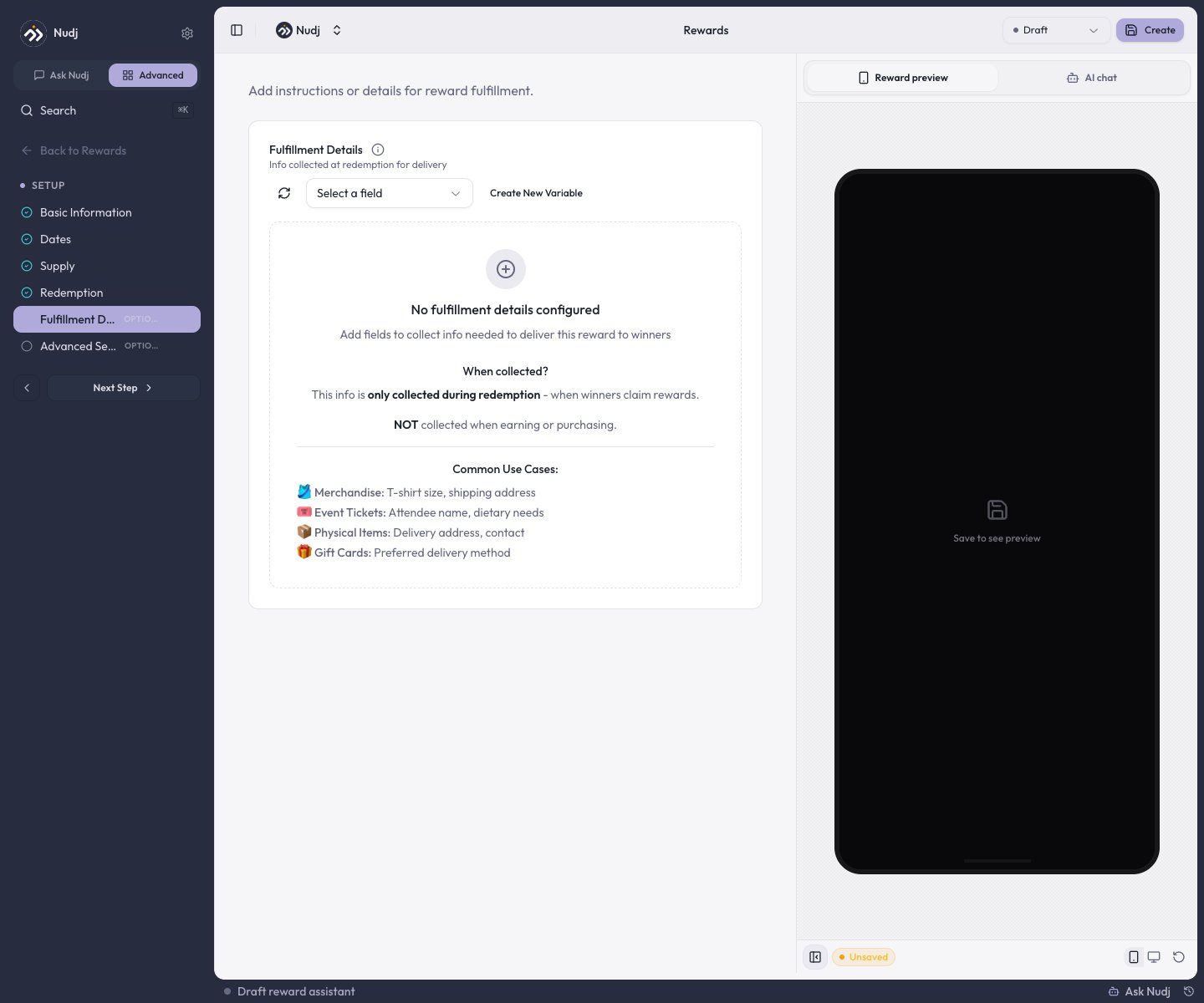 This optional step collects extra information from a member **at the moment they redeem** - not when they earn or buy the reward. Use **Create New Variable** to add a field, or **Select a field** to reuse one you've defined before.
Typical uses: T-shirt size and shipping address for merchandise, attendee name for event tickets, or a delivery address for physical items.
Whatever you collect here shows up later in the reward's **Fulfilment** tab, where you confirm and action each redemption. See [Redemption & Fulfilment](/admin-guide/rewards/redemption-and-fulfilment).
***
## Advanced Settings
The optional **Advanced Settings** step is a stack of collapsible sections for the long-tail config most rewards don't need:
This optional step collects extra information from a member **at the moment they redeem** - not when they earn or buy the reward. Use **Create New Variable** to add a field, or **Select a field** to reuse one you've defined before.
Typical uses: T-shirt size and shipping address for merchandise, attendee name for event tickets, or a delivery address for physical items.
Whatever you collect here shows up later in the reward's **Fulfilment** tab, where you confirm and action each redemption. See [Redemption & Fulfilment](/admin-guide/rewards/redemption-and-fulfilment).
***
## Advanced Settings
The optional **Advanced Settings** step is a stack of collapsible sections for the long-tail config most rewards don't need:
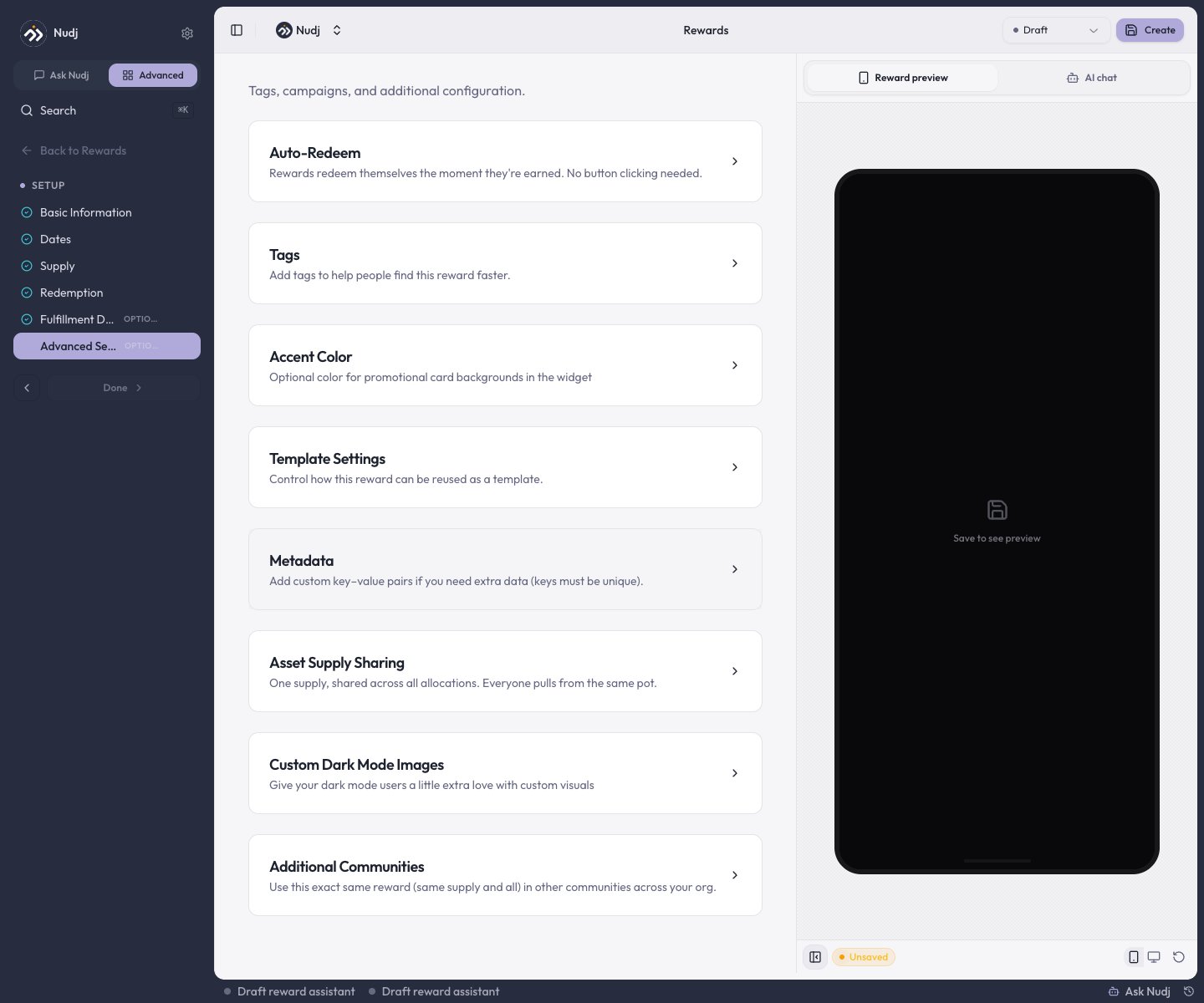 Claim the reward automatically the moment it's earned - no member action. See [Advanced Features](/admin-guide/rewards/advanced-features#auto-redeem).
Organisation-scoped labels for filtering and reporting.
A per-reward accent colour used in the member app.
A key-value map for arbitrary data you want exposed to integrations and webhooks.
Scope the reward to more than one community in your org. See [Advanced Features](/admin-guide/rewards/advanced-features#additional-communities).
**Template Settings**, **Asset Supply Sharing**, and **Custom Dark Mode Images**.
***
## Reward status
The **status** dropdown in the top bar controls whether a reward is visible and distributing. It has five states: **Draft** (hidden while you set it up), **Live** (visible to members now), **Scheduled** (publishes on the start date), **Archived** (hidden and retired, kept for records), and **Expired** (past its end date).
Claim the reward automatically the moment it's earned - no member action. See [Advanced Features](/admin-guide/rewards/advanced-features#auto-redeem).
Organisation-scoped labels for filtering and reporting.
A per-reward accent colour used in the member app.
A key-value map for arbitrary data you want exposed to integrations and webhooks.
Scope the reward to more than one community in your org. See [Advanced Features](/admin-guide/rewards/advanced-features#additional-communities).
**Template Settings**, **Asset Supply Sharing**, and **Custom Dark Mode Images**.
***
## Reward status
The **status** dropdown in the top bar controls whether a reward is visible and distributing. It has five states: **Draft** (hidden while you set it up), **Live** (visible to members now), **Scheduled** (publishes on the start date), **Archived** (hidden and retired, kept for records), and **Expired** (past its end date).
 Save any reward as **Draft** while you finalise copy or wait on assets - a Draft reward **won't distribute even if it's attached to a Live challenge**. Flip it to **Live** when you're ready.
***
## Validation gotchas
* **Redemption config is required** for a claimable reward before it can go Live - a text message, a code list, a URL, or instructions.
* A finite reward with **zero remaining supply** saves but can't distribute - check the Supply step before launch.
* The **Use-It-or-Lose-It Date** is required on Regular and Giveaway rewards; Badge, XP Boost, and Points Boost rewards don't have one.
Validation errors surface inline on the offending step with an actionable message.
***
## Next steps
The full taxonomy of reward shapes.
How members redeem, and where you confirm fulfilment.
Auto-redeem, cross-community, draft rewards, scheduling.
Let members buy rewards with points.
Save any reward as **Draft** while you finalise copy or wait on assets - a Draft reward **won't distribute even if it's attached to a Live challenge**. Flip it to **Live** when you're ready.
***
## Validation gotchas
* **Redemption config is required** for a claimable reward before it can go Live - a text message, a code list, a URL, or instructions.
* A finite reward with **zero remaining supply** saves but can't distribute - check the Supply step before launch.
* The **Use-It-or-Lose-It Date** is required on Regular and Giveaway rewards; Badge, XP Boost, and Points Boost rewards don't have one.
Validation errors surface inline on the offending step with an actionable message.
***
## Next steps
The full taxonomy of reward shapes.
How members redeem, and where you confirm fulfilment.
Auto-redeem, cross-community, draft rewards, scheduling.
Let members buy rewards with points.