> ## Documentation Index
> Fetch the complete documentation index at: https://docs.nudj.cx/llms.txt
> Use this file to discover all available pages before exploring further.
# Gift Rewards
> Send rewards, bonus points, or XP directly to selected members: search or CSV, then confirm
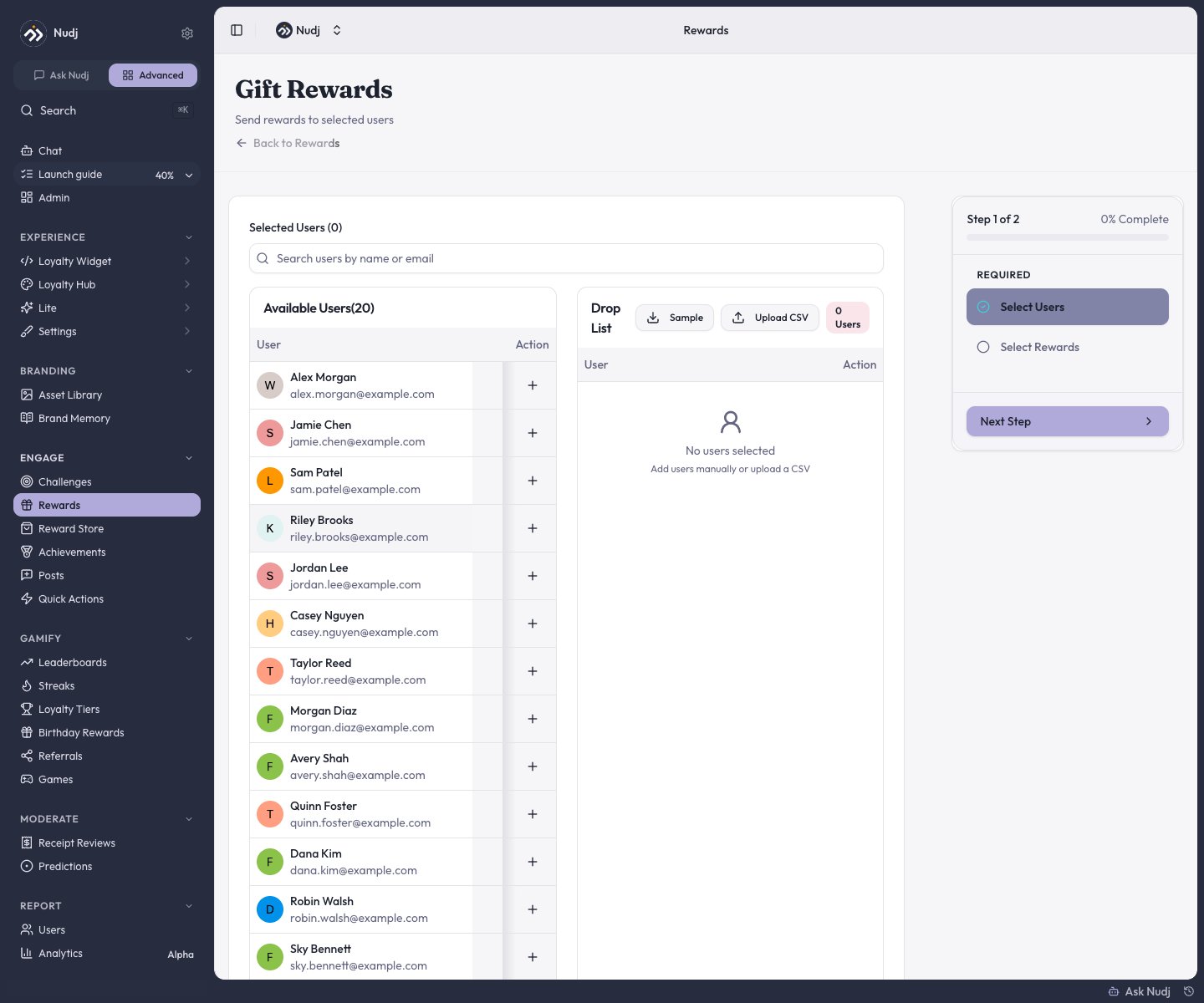
**Gift Rewards** sends rewards straight to members you pick, skipping the normal earn flow. It also covers what used to be called "reward drops": one flow handles a single VIP or a 500-person list, and it always distributes **immediately**.
 ## Where to start
Any of these opens the same flow:
* **Engagement -> Rewards** -> the **Gift Rewards** button.
* **Users** -> the **Gift Rewards** button.
* A member's stats page -> the **...** menu -> **Gift Reward**.
* The new-reward screen's **Gift or drop rewards** card.
Gifting needs **Admin or above** - it can grant currency alongside rewards, which Manager roles can't create.
## The flow
Search members **by name or email** and add them to the Drop List one by one, or **Upload CSV** with up to **500 rows** of emails or usernames (a sample file is provided).
Pick one or more rewards, and optionally add **Bonus XP** and **Points** per recipient. You can also send only points/XP with no reward at all.
The confirmation summarises recipients, currency, and rewards. Gifting is immediate and **can't be undone**.
After sending, a summary reports how many members were processed and lists any that failed.
## Rules to know
* **Supply is checked up front**: if the reward doesn't have enough remaining supply for every recipient, the whole gift is rejected before anything sends.
* **Per-user caps are respected quietly**: a member already at the reward's per-user limit is skipped for that reward (their bonus points/XP still arrive) - no error is raised.
* Gifts consume the reward's normal supply pool and appear in the reward's [Allocations](/admin-guide/rewards/analytics) as **Manual Reward Distribution**.
For a reward that should *only* ever be gifted, just never attach it to a challenge or the shop - there's no special toggle needed. See [Advanced Features](/admin-guide/rewards/advanced-features#gifting-only-rewards).
## Adjusting points directly
Separate from gifting: on a member's stats page, the **...** menu has **Manage Points** for crediting or debiting a member's points balance (Admin+; there is no XP adjustment). Use it for corrections rather than sending a gift.
## Next steps
Something worth gifting.
Supply sharing and per-user caps.
Let chance pick the winners instead.
Where gifts show up in the numbers.
## Where to start
Any of these opens the same flow:
* **Engagement -> Rewards** -> the **Gift Rewards** button.
* **Users** -> the **Gift Rewards** button.
* A member's stats page -> the **...** menu -> **Gift Reward**.
* The new-reward screen's **Gift or drop rewards** card.
Gifting needs **Admin or above** - it can grant currency alongside rewards, which Manager roles can't create.
## The flow
Search members **by name or email** and add them to the Drop List one by one, or **Upload CSV** with up to **500 rows** of emails or usernames (a sample file is provided).
Pick one or more rewards, and optionally add **Bonus XP** and **Points** per recipient. You can also send only points/XP with no reward at all.
The confirmation summarises recipients, currency, and rewards. Gifting is immediate and **can't be undone**.
After sending, a summary reports how many members were processed and lists any that failed.
## Rules to know
* **Supply is checked up front**: if the reward doesn't have enough remaining supply for every recipient, the whole gift is rejected before anything sends.
* **Per-user caps are respected quietly**: a member already at the reward's per-user limit is skipped for that reward (their bonus points/XP still arrive) - no error is raised.
* Gifts consume the reward's normal supply pool and appear in the reward's [Allocations](/admin-guide/rewards/analytics) as **Manual Reward Distribution**.
For a reward that should *only* ever be gifted, just never attach it to a challenge or the shop - there's no special toggle needed. See [Advanced Features](/admin-guide/rewards/advanced-features#gifting-only-rewards).
## Adjusting points directly
Separate from gifting: on a member's stats page, the **...** menu has **Manage Points** for crediting or debiting a member's points balance (Admin+; there is no XP adjustment). Use it for corrections rather than sending a gift.
## Next steps
Something worth gifting.
Supply sharing and per-user caps.
Let chance pick the winners instead.
Where gifts show up in the numbers.