> ## Documentation Index
> Fetch the complete documentation index at: https://docs.nudj.cx/llms.txt
> Use this file to discover all available pages before exploring further.
# The Reward Store
> The points shop: list rewards for purchase, set prices and stock, and let members spend their points
The **Reward Store** is where members spend **points** on rewards. You curate it from **Engagement -> Reward Store** in the admin sidebar.
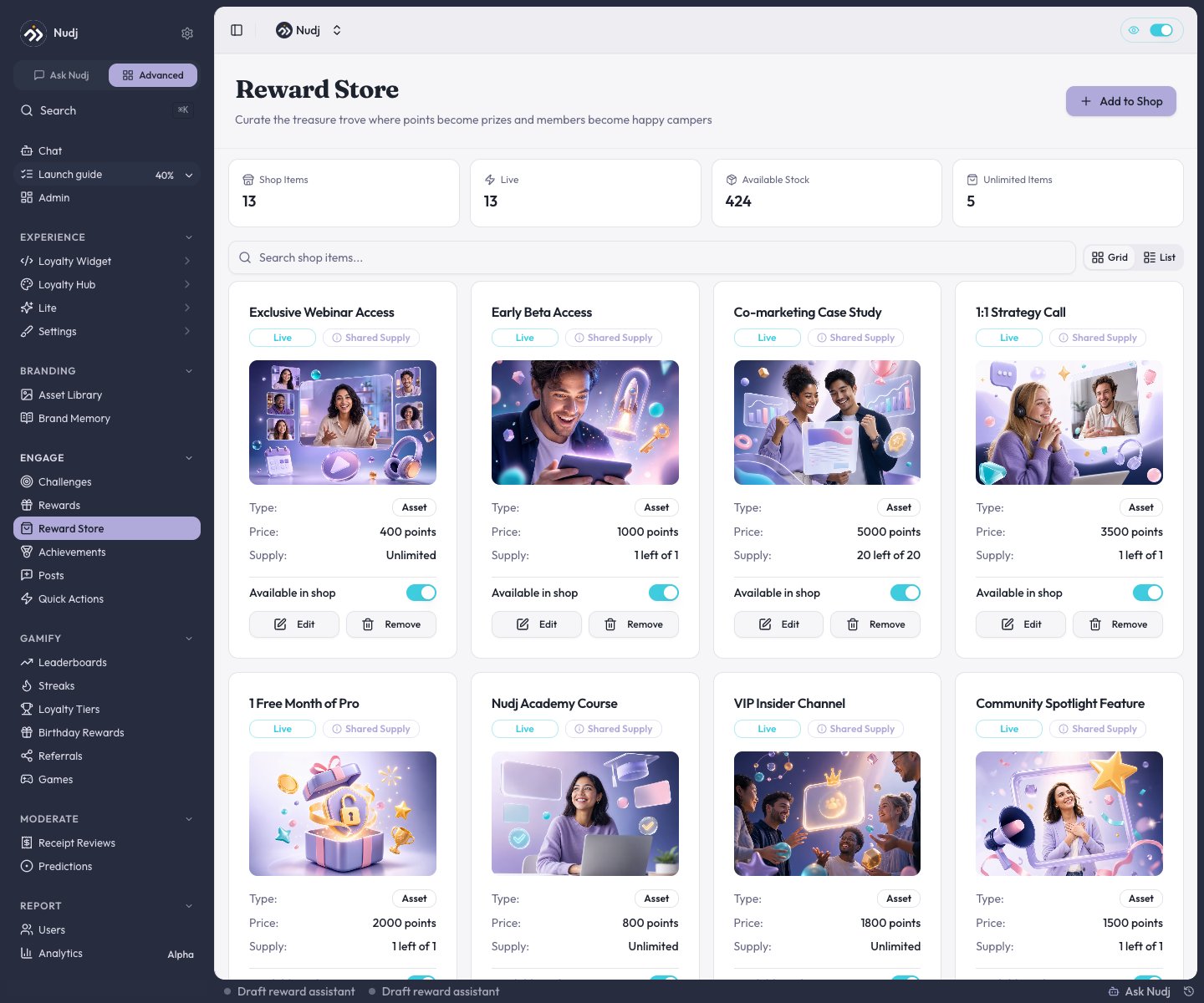 Each card shows the reward's **points price**, its remaining **supply**, an **Available in shop** switch, and **Edit** / **Remove** actions.
***
## Turning the shop on or off
The shop switch is **organisation-wide**: the **Rewards Shop** toggle in **Organisation Settings -> Features** (or the **Shop** pill at the top of the Reward Store page itself). Turning it off hides the member-facing shop across your org: the Shop nav item disappears, and prices, checkout, and purchase controls are suppressed, so members can no longer browse to or buy from the shop.
There is no per-community shop toggle. The Community Settings Features tab controls points, leaderboards, posts, and similar, but not the shop.
***
## Listing a reward in the shop
Two ways in:
Click **Add to Shop**, pick any non-expired reward that isn't already listed, and set its shop terms.
On the reward's [Supply](/admin-guide/rewards/creating-regular-rewards#supply) step, the **Shop Settings** card opens the shop terms for a listed reward, or takes you to the Reward Store to list it. The button is disabled until the reward has been saved once.
The shop terms are:
Each card shows the reward's **points price**, its remaining **supply**, an **Available in shop** switch, and **Edit** / **Remove** actions.
***
## Turning the shop on or off
The shop switch is **organisation-wide**: the **Rewards Shop** toggle in **Organisation Settings -> Features** (or the **Shop** pill at the top of the Reward Store page itself). Turning it off hides the member-facing shop across your org: the Shop nav item disappears, and prices, checkout, and purchase controls are suppressed, so members can no longer browse to or buy from the shop.
There is no per-community shop toggle. The Community Settings Features tab controls points, leaderboards, posts, and similar, but not the shop.
***
## Listing a reward in the shop
Two ways in:
Click **Add to Shop**, pick any non-expired reward that isn't already listed, and set its shop terms.
On the reward's [Supply](/admin-guide/rewards/creating-regular-rewards#supply) step, the **Shop Settings** card opens the shop terms for a listed reward, or takes you to the Reward Store to list it. The button is disabled until the reward has been saved once.
The shop terms are:
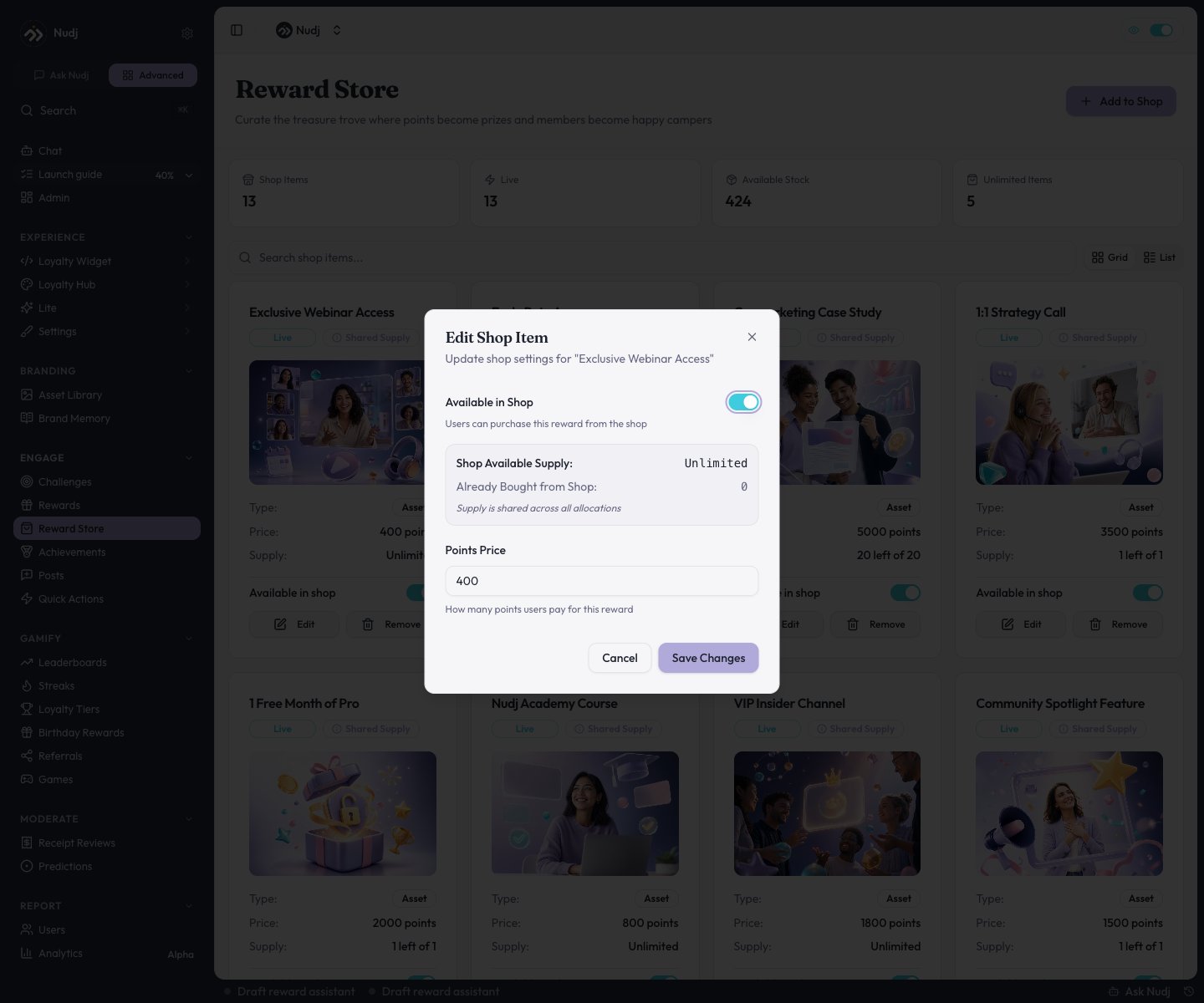 * **Points Price** - what a member pays per unit.
* **Available in Shop** - show or hide the listing without removing it.
* **Limited Shop Supply** - cap how many can be bought from the shop (hidden when the reward shares one supply pool across all its allocations). The dialog also shows how many are already bought vs still available.
**Per-member purchase caps are not a shop setting.** They come from the reward's own Supply step (**Limited Per User**). A member at their cap can't buy more, no matter what the shop terms say.
***
## How members buy
Members open **Shop** in the main navigation of the member app. It lists every **live** reward with an active shop listing; the detail view shows the points price, remaining stock, and a purchase button.
Purchases:
* Deduct the points and place the reward straight into the member's **wallet**.
* Are capped per purchase (up to 5 at a time) and by the reward's per-user limit.
* Fail cleanly when points or stock run short.
***
## Purchase safeguards
Every purchase runs as a single transaction with duplicate-tap protection, and the checks run in a safe order:
* **Per-user cap is checked before any points are taken** - hitting the cap never costs the member points.
* **Insufficient balance** and **insufficient stock** are both blocked with a clear error.
* Shop purchases and challenge distributions both update supply transactionally, so stock counts stay consistent.
***
## Shop purchases in analytics
On a reward's **Stats** page, shop activity is broken out as its own source: the Overview's "where people won it" chart has a **shop** slice, and the Allocations tab labels shop listings as **Shop Purchase**. See [Reward Analytics](/admin-guide/rewards/analytics).
***
## Pricing tips
Price rewards so a member can afford something meaningful after 2-3 challenges. Too expensive and the shop feels out of reach; too cheap and points feel worthless.
Mix always-available shop rewards with limited-time challenge-earned rewards. The variety keeps both the shop and the wallet feeling fresh.
***
## Next steps
Set supply and per-user caps on the Supply step.
What happens after a member buys or earns.
Points are the spendable currency behind the shop.
Purchases as a distribution source.
* **Points Price** - what a member pays per unit.
* **Available in Shop** - show or hide the listing without removing it.
* **Limited Shop Supply** - cap how many can be bought from the shop (hidden when the reward shares one supply pool across all its allocations). The dialog also shows how many are already bought vs still available.
**Per-member purchase caps are not a shop setting.** They come from the reward's own Supply step (**Limited Per User**). A member at their cap can't buy more, no matter what the shop terms say.
***
## How members buy
Members open **Shop** in the main navigation of the member app. It lists every **live** reward with an active shop listing; the detail view shows the points price, remaining stock, and a purchase button.
Purchases:
* Deduct the points and place the reward straight into the member's **wallet**.
* Are capped per purchase (up to 5 at a time) and by the reward's per-user limit.
* Fail cleanly when points or stock run short.
***
## Purchase safeguards
Every purchase runs as a single transaction with duplicate-tap protection, and the checks run in a safe order:
* **Per-user cap is checked before any points are taken** - hitting the cap never costs the member points.
* **Insufficient balance** and **insufficient stock** are both blocked with a clear error.
* Shop purchases and challenge distributions both update supply transactionally, so stock counts stay consistent.
***
## Shop purchases in analytics
On a reward's **Stats** page, shop activity is broken out as its own source: the Overview's "where people won it" chart has a **shop** slice, and the Allocations tab labels shop listings as **Shop Purchase**. See [Reward Analytics](/admin-guide/rewards/analytics).
***
## Pricing tips
Price rewards so a member can afford something meaningful after 2-3 challenges. Too expensive and the shop feels out of reach; too cheap and points feel worthless.
Mix always-available shop rewards with limited-time challenge-earned rewards. The variety keeps both the shop and the wallet feeling fresh.
***
## Next steps
Set supply and per-user caps on the Supply step.
What happens after a member buys or earns.
Points are the spendable currency behind the shop.
Purchases as a distribution source.