> ## Documentation Index
> Fetch the complete documentation index at: https://docs.nudj.cx/llms.txt
> Use this file to discover all available pages before exploring further.
# Giveaways
> Entry-based prize draws: entry period, draw date, automatic or manual winner selection, and entrant tracking
A **Giveaway** is a prize draw. Members collect **entries** during an entry period; at the draw, winners receive the reward. Some teams call these sweepstakes, but across Nudj the term is giveaways.
A giveaway runs in three phases, and the reward studio mirrors them:
1. **Entry period** - members earn entries between *Entries Open* and *Entries Close*.
2. **The draw** - at the *draw date*, winners are selected automatically or by you.
3. **Redemption** - winners claim their prize before its redeem-by deadline.
***
## Creating a giveaway
Pick **Giveaway Reward** in the [type picker](/admin-guide/rewards/reward-types). The wizard is the same six steps as a Regular reward, with two steps adapted:
### Dates
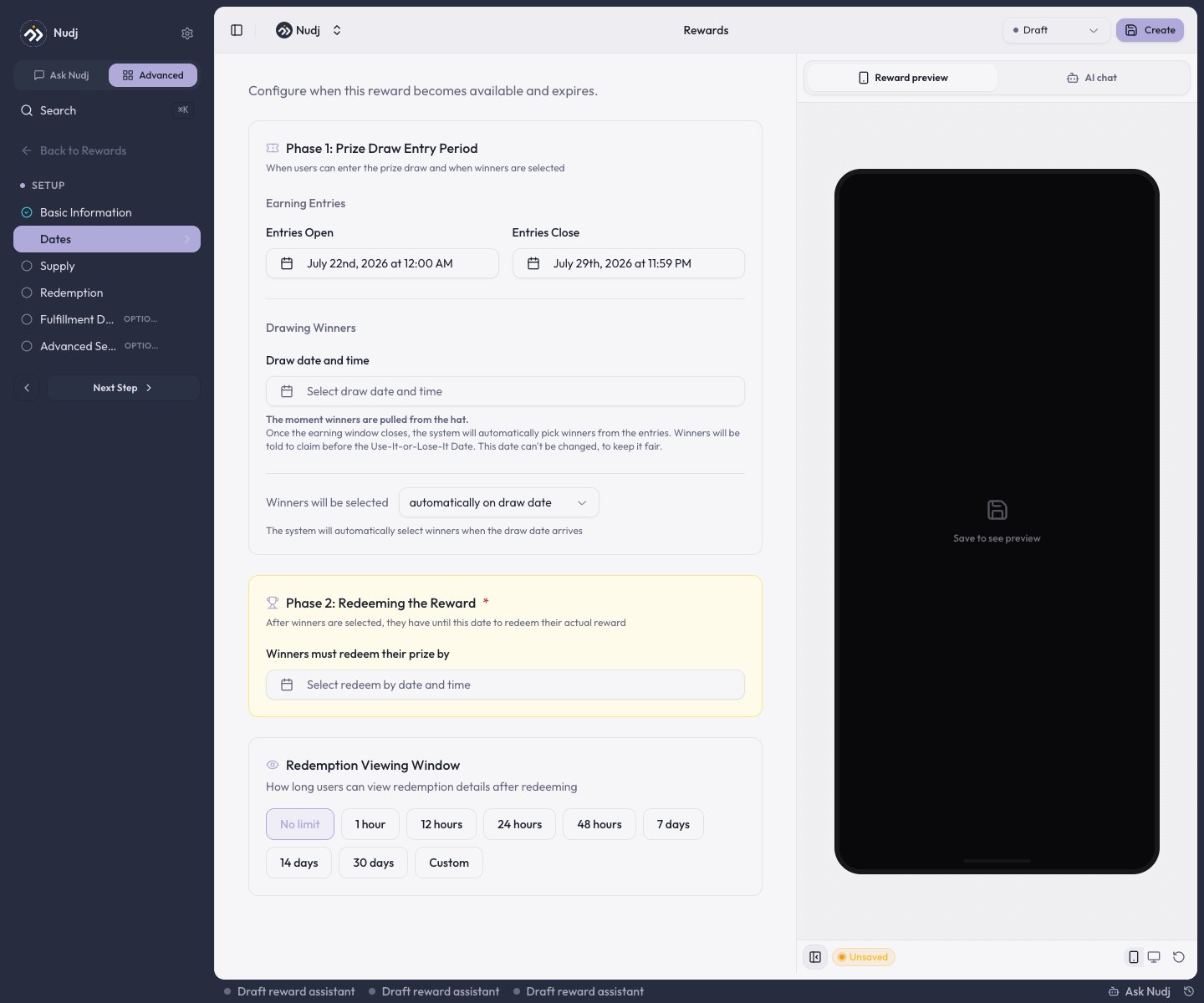 * **Phase 1: Prize Draw Entry Period** - **Entries Open** and **Entries Close** date-times.
* **Drawing Winners** - the **draw date and time**, plus whether winners are selected **automatically on draw date** or **manually by admin**.
* **Phase 2: Redeeming the Reward** - the date **winners must redeem their prize by**.
The scheduling rules the form enforces: the draw must be **on or after Entries Close**; a draw date is **required** before an entries reward can publish; the draw date **locks once members hold entries** (unless the reward is back in Draft); and the redeem-by deadline must be **at least 24 hours after the draw**. Picking Entries Close auto-fills a sensible draw date and redeem-by, which you can then adjust.
### Supply
* **Phase 1: Prize Draw Entry Period** - **Entries Open** and **Entries Close** date-times.
* **Drawing Winners** - the **draw date and time**, plus whether winners are selected **automatically on draw date** or **manually by admin**.
* **Phase 2: Redeeming the Reward** - the date **winners must redeem their prize by**.
The scheduling rules the form enforces: the draw must be **on or after Entries Close**; a draw date is **required** before an entries reward can publish; the draw date **locks once members hold entries** (unless the reward is back in Draft); and the redeem-by deadline must be **at least 24 hours after the draw**. Picking Entries Close auto-fills a sensible draw date and redeem-by, which you can then adjust.
### Supply
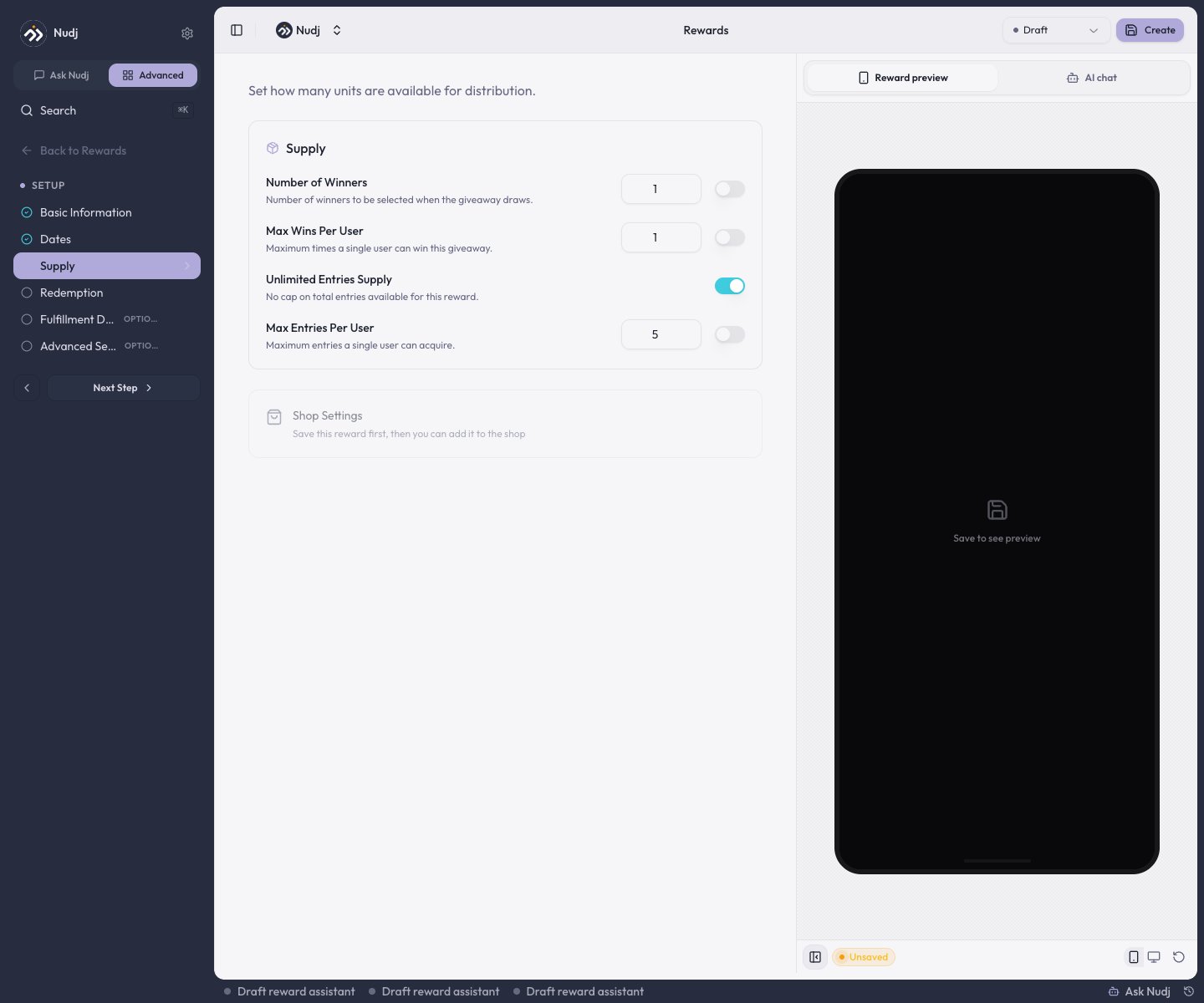 * **Number of Winners** - how many prizes exist (or **Unlimited Winners**).
* **Max Wins Per User** - one member can win more than once unless you cap it.
* **Total Entries Supply** and **Max Entries Per User** - cap the ticket pool overall and per member.
***
## How members earn entries
* **Challenges** - attach the giveaway on a challenge's **Distribution** step; the amount you set there is entries per completion. Achievements distribute entries the same way.
* **The shop** - list the giveaway in the [Reward Store](/admin-guide/rewards/shop-integration) with an entry price and members buy entries with points.
Entries can only be collected while the entry period is open. Once **Entries Close** passes (or the draw has run), earning and buying entries is rejected.
***
## The draw
**Automatic** giveaways draw themselves at the draw date. Selection is a **weighted random draw**: every entry is a ticket, so a member with 10 entries has ten times the chance of a member with 1. Winners are drawn until the prize supply is used up, respecting **Max Wins Per User**. Each giveaway draws **once**.
**Manual** giveaways wait for you. After the draw date passes, open the reward's **Stats -> Users** tab, select the winning members, and click **Assign as Winners**. You must select exactly as many members as there are remaining prizes.
Automatic and manual are set at creation on the Dates step and are mutually exclusive: an automatic giveaway can't be hand-picked, and a manual one never draws itself. There is also no way to remove or disqualify individual entries, so in a manual giveaway, handle suspect activity by simply not selecting those members.
***
## After the draw
* **Winners** get the reward as an asset in their **wallet**, with its redemption code attached, and must redeem it before the Phase 2 deadline.
* **Losers** keep their entries, which resolve to a "better luck next time" state.
* **Nobody is emailed.** There is no winner notification; members discover the result in the app - the wallet feed and the widget's giveaway card show "You won!" or the losing state. Announce winners yourself with a [post](/admin-guide/posts/creating-posts) if you want the moment amplified.
***
## Tracking entrants
The reward's **Stats -> Users** tab lists every entrant with their **Total Entries** and **Last Entry** (plus a **Winner Status** column once a manual giveaway is drawn). Two exports:
* **Export Users CSV** - the full entrant list with entry counts and, once drawn, per-user ticket outcomes.
* **Tracking template CSV** (manual giveaways) - the same list with empty contact/winner-rank columns for running your draw offline.
Keep the export for compliance archiving if your jurisdiction requires it.
***
## Next steps
The full studio walkthrough.
What winners do after the draw.
Sell entries for points.
Deliver to a fixed list directly, no draw involved.
* **Number of Winners** - how many prizes exist (or **Unlimited Winners**).
* **Max Wins Per User** - one member can win more than once unless you cap it.
* **Total Entries Supply** and **Max Entries Per User** - cap the ticket pool overall and per member.
***
## How members earn entries
* **Challenges** - attach the giveaway on a challenge's **Distribution** step; the amount you set there is entries per completion. Achievements distribute entries the same way.
* **The shop** - list the giveaway in the [Reward Store](/admin-guide/rewards/shop-integration) with an entry price and members buy entries with points.
Entries can only be collected while the entry period is open. Once **Entries Close** passes (or the draw has run), earning and buying entries is rejected.
***
## The draw
**Automatic** giveaways draw themselves at the draw date. Selection is a **weighted random draw**: every entry is a ticket, so a member with 10 entries has ten times the chance of a member with 1. Winners are drawn until the prize supply is used up, respecting **Max Wins Per User**. Each giveaway draws **once**.
**Manual** giveaways wait for you. After the draw date passes, open the reward's **Stats -> Users** tab, select the winning members, and click **Assign as Winners**. You must select exactly as many members as there are remaining prizes.
Automatic and manual are set at creation on the Dates step and are mutually exclusive: an automatic giveaway can't be hand-picked, and a manual one never draws itself. There is also no way to remove or disqualify individual entries, so in a manual giveaway, handle suspect activity by simply not selecting those members.
***
## After the draw
* **Winners** get the reward as an asset in their **wallet**, with its redemption code attached, and must redeem it before the Phase 2 deadline.
* **Losers** keep their entries, which resolve to a "better luck next time" state.
* **Nobody is emailed.** There is no winner notification; members discover the result in the app - the wallet feed and the widget's giveaway card show "You won!" or the losing state. Announce winners yourself with a [post](/admin-guide/posts/creating-posts) if you want the moment amplified.
***
## Tracking entrants
The reward's **Stats -> Users** tab lists every entrant with their **Total Entries** and **Last Entry** (plus a **Winner Status** column once a manual giveaway is drawn). Two exports:
* **Export Users CSV** - the full entrant list with entry counts and, once drawn, per-user ticket outcomes.
* **Tracking template CSV** (manual giveaways) - the same list with empty contact/winner-rank columns for running your draw offline.
Keep the export for compliance archiving if your jurisdiction requires it.
***
## Next steps
The full studio walkthrough.
What winners do after the draw.
Sell entries for points.
Deliver to a fixed list directly, no draw involved.