

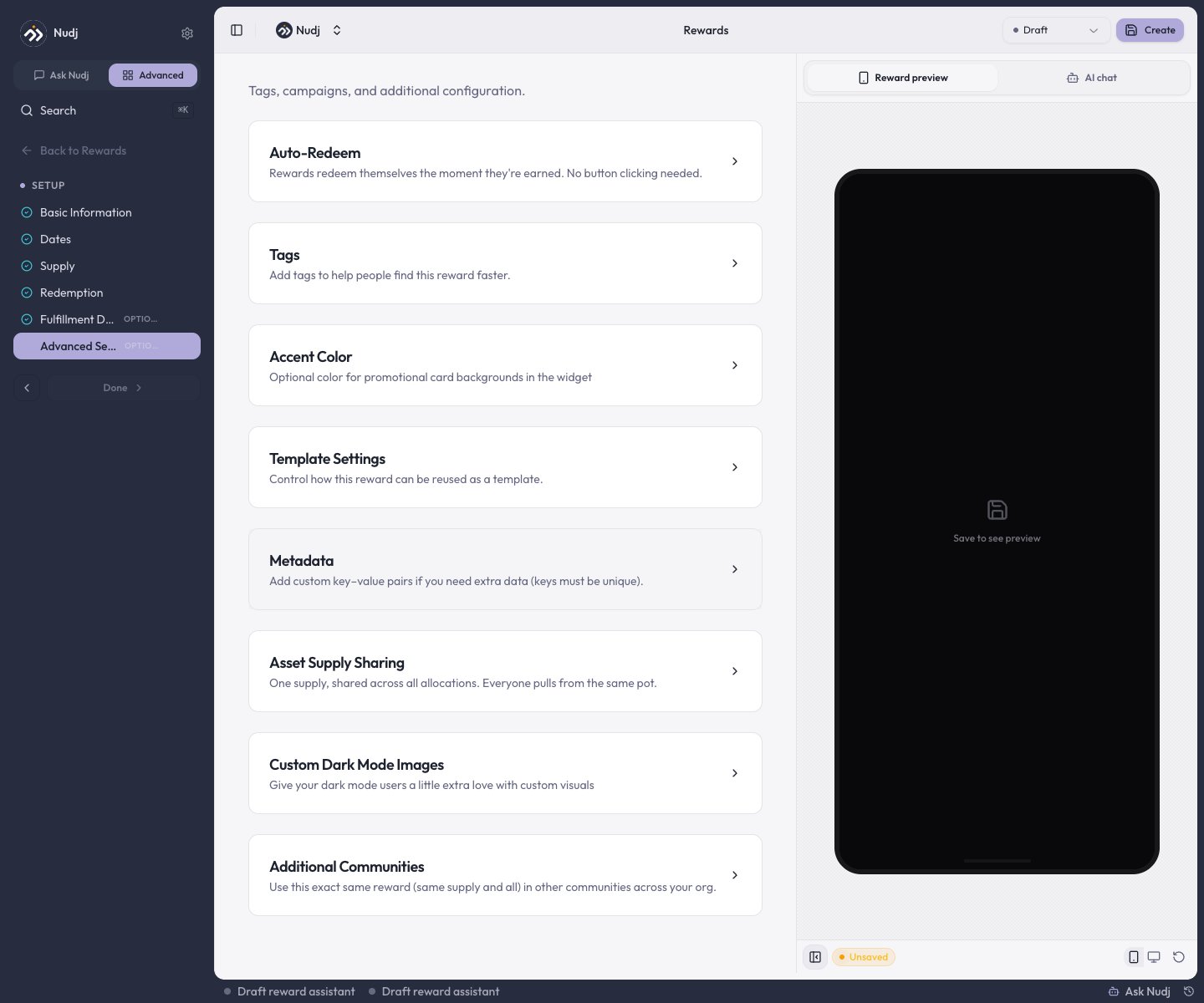
Once you have the basics of your reward down, advanced features let you control exactly how rewards are distributed, redeemed, and tracked. Think of these as the dials and switches that make your reward system work exactly how you want.
Not required: All advanced features have sensible defaults. Only customize if you need specific behavior for your campaign.

Allocation Methods

When you have multiple users eligible for the same reward, how do they get distributed? The allocation method determines the fairness and strategy of the distribution.

Random Allocation

Pure luck-based distributionEvery eligible user has an equal chance. Perfect for fairness and preventing gaming the system. Most common choice.

Priority-Based Allocation

Reward the most engagedUsers with higher engagement scores get priority. Great for recognizing your most active community members first.

List-Based Allocation

Manual or imported distributionUpload a specific list of users who receive rewards. Useful for targeted campaigns or special promotions.

How to Choose

Use Random if:
  • You want maximum fairness and transparency
  • You’re running a public contest or giveaway
  • You want to encourage all user segments to participate
Use Priority-Based if:
  • You want to reward loyal/engaged users
  • You’re incentivizing specific behaviors
  • You want to tier rewards by engagement level
Use List-Based if:
  • You’re running a targeted campaign for specific users
  • You have a curated selection criteria
  • You’re integrating with an external system

Auto-Redeem Settings

Auto-redeem determines whether rewards are automatically sent to users or whether they need to claim them manually.
  • Auto-Redeem: ON
  • Auto-Redeem: OFF
Instant gratificationThe reward is immediately sent/activated when earned. Great for:
  • Instant codes or discounts
  • Digital access that can be granted immediately
  • Badges and achievements
  • Points or XP credits
Users get their reward without lifting a finger.

Redeem By Date

Optional deadline for claiming rewards. After this date, unclaimed rewards expire. Leave blank if you want rewards to never expire (like achievement badges). Set a date if you’re running a campaign with limited-time value or need to manage inventory cleanup.

Inventory & Supply Management

Control how many of each reward can be distributed and what happens when supplies run out.

Limited Supply

Set a specific quantity: “Only 500 discount codes available”Once users redeem that amount, the reward is no longer available. Creates urgency and scarcity.

Unlimited Supply

Infinite availability: Set to “Unlimited” for rewards that don’t have physical constraintsPerfect for digital rewards, badges, points, or any reward where quantity isn’t a concern.

Tracking Supply

The system automatically tracks:
  • Total allocated: How many you’ve given out
  • Remaining: How many are left (if limited)
  • Pending claims: Rewards claimed but not yet redeemed

Metadata Fields

Custom data fields for capturing additional information about rewards or tracking special attributes. Common use cases:
  • Tracking
  • Fulfillment
  • Analytics
  • Campaign source: campaign_id: "holiday-2025"
  • Campaign phase: phase: "launch" or phase: "extension"
  • Partner attribution: partner: "partner-name"
Example metadata setup:
campaign_id: "summer-giveaway"
shipping_type: "standard"
batch_number: "B2025-001"
This metadata appears in analytics reports and can be used to segment winners or track fulfillment.

Audience Targeting & Eligibility

Restrict who can earn or claim a reward based on specific criteria.

User Segment Targeting

Limit by user characteristicsOnly show/allow rewards for specific user segments: VIP members, users in certain regions, specific activity levels, etc.

Behavior-Based Eligibility

Require specific actions firstUsers must complete certain challenges, reach engagement milestones, or achieve specific badges before they can earn this reward.

Setting Up Eligibility

  1. Who can see it: Control reward visibility (all users, VIP only, specific communities)
  2. Who can earn it: Set behavior requirements (must complete 5 challenges, must reach level 10, etc.)
  3. When they can claim it: Time windows, gating rules, permission checks
Example: “VIP members only can redeem this exclusive merchandise, and only after they’ve completed the onboarding series.”

Multi-Community Rewards

This is where things get powerful. You can create a single reward that works across multiple communities in your organization.
When to use: You have multiple communities (different brands, regions, departments) that share a central reward economy.

How Multi-Community Rewards Work

Instead of creating separate rewards for each community, you create one reward and decide:
  1. Which communities have access: The reward is available in specific communities (or all of them)
  2. Shared supply or per-community: Do all communities pull from the same pool, or does each get their own allocation?
  3. Unified analytics: See performance across all communities in one dashboard

Use Cases

  • Global Brand Campaign
  • Departmental Program
  • Tiered Rollout
Same reward across all regionsYou’re launching a “Buy X, Get Y” offer across US, EU, and APAC communities. Each region has the same offer and shared supply pool (e.g., 10,000 codes total).

Configuring Multi-Community Rewards

When editing the advanced settings:
Community Access:
  ☑ North America Community
  ☑ Europe Community
  ☑ Asia Pacific Community
  ☐ Partner Program

Supply Allocation:
  ○ Shared pool (one global supply)
  ○ Per-community allocation (each community gets its own quota)
Shared pool = 1,000 total codes across all three communities Per-community = 1,000 codes per community (3,000 total)

Multi-Community Analytics

When you view reward stats, you can see:
  • Aggregate view: Performance across all communities
  • Community breakdown: Which community is driving the most claims
  • Supply tracking: How supply is being consumed per community

Testing & Validation

Before launching a reward with these advanced settings, test the combination:
1

Create in Draft

Set up the reward in Draft status while you’re configuring advanced options
2

Test Scenarios

Create test user accounts and walk through the reward path:
  • Can eligible users see it?
  • Can ineligible users see it?
  • Does auto-redeem work correctly?
  • Does the allocation method work as expected?
3

Preview

Use the Preview feature to see the reward from a user perspective
4

Go Live

Move to Live status once you’re confident in the configuration

When Things Get Complex

If you’re configuring:
  • Multi-community rewards with different supply pools per community
  • Audience targeting + auto-redeem with behavior requirements
  • List-based allocation with priority overrides
…consider documenting your setup. These configurations are powerful but can have subtle interactions.
Advanced features are best used when you have a clear strategy. If you’re unsure, use the defaults and iterate. You can always adjust advanced settings on an existing reward.
Need help deciding? Think about your campaign goals first, then work backwards to the advanced settings that support those goals.